 qubosis
Build an evidence library
Import documents, extract text, and use bundled English OCR for individual scanned pages when needed.
RESEARCH & EVIDENCE / LITERATURE & EVIDENCE

Find the evidence. Keep the context.
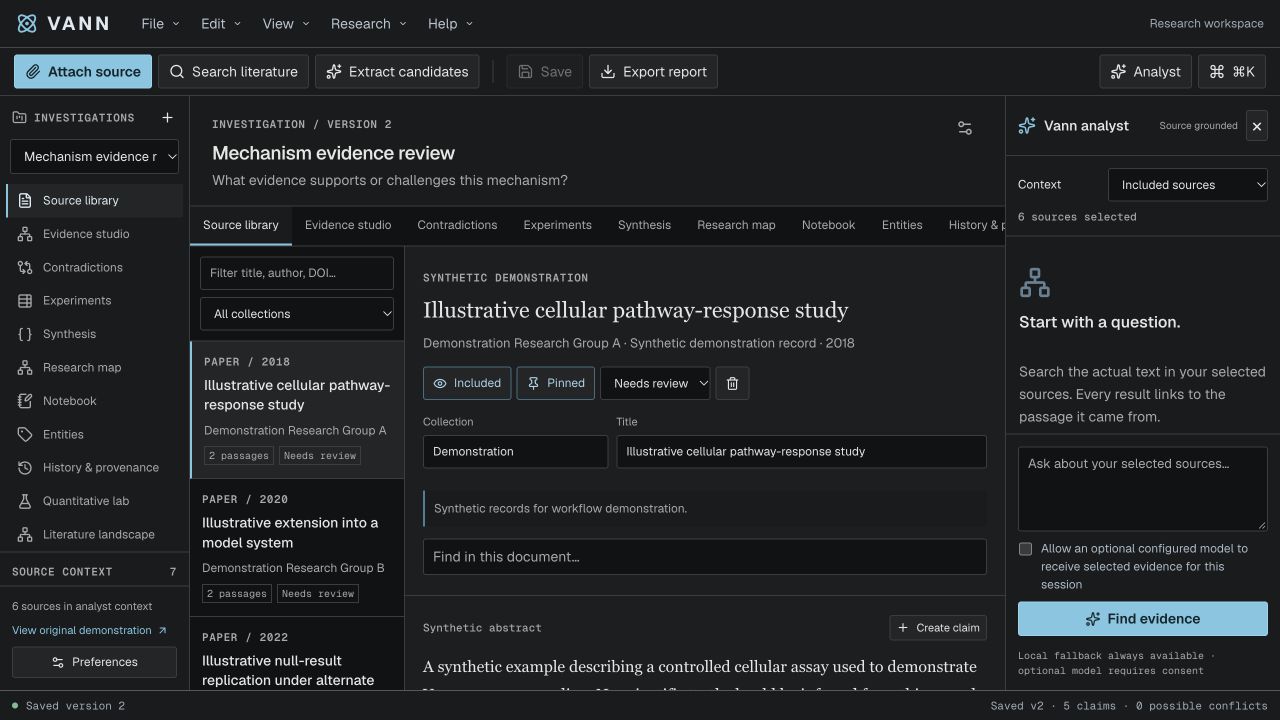
Build a source-grounded literature workspace. Vann helps research teams read papers, capture exact passages, organize claims, and review the evidence behind a scientific question without losing where a statement came from.
01 / OVERVIEW
Build a source-grounded literature workspace. Vann helps research teams read papers, capture exact passages, organize claims, and review the evidence behind a scientific question without losing where a statement came from.
The sections below describe the product capabilities, use cases, system requirements, and documented workflow in the source application.
02 / FEATURES
This inventory explains what each capability does, which records and decisions it touches, and where its scientific or operational boundary applies. External services and unavailable engines are identified as such.
Import documents, extract text, and use bundled English OCR for individual scanned pages when needed.
Link claims and measurements to source passages. Track screening decisions, annotations, and review protocols.
Explore evidence networks, pool compatible measurements, and export structured investigations.
Search bibliographic records and literature sources with provider-aware status and caching. Inspect whether a result is an abstract, a linked record, or accessible full text; a search hit does not mean that Vann has obtained or indexed the entire paper.
Import PDF, DOCX, XLSX, text, and supported bibliography records. Review extraction status, citation metadata, license, page or section references, and original-source availability before using parsed passages in a claim.
Define review scope and eligibility rules, then record include, exclude, or uncertain decisions with a reason. A screening queue makes the decision trail easier to revisit and keeps protocol decisions separate from evidence strength.
Capture the exact source passage behind a claim and record its page or section, interpretation, stance, evidence strength, and review reason as distinct fields. Rule-generated claim candidates are prompts for a researcher to verify, not automatically accepted evidence.
Store values with units, populations, conditions, comparators, and source locations. The pooling workflow supports inverse-variance fixed- and random-effects estimates and forest plots when measures are compatible and their required uncertainty inputs are present.
Explore how sources, authors, topics, claims, and entities connect. Candidate contradiction views and graph structure help direct review, but they do not establish a scientific conflict, causal relationship, or overall evidence quality by themselves.
Run bounded extraction pipelines and use the bundled English OCR engine for an individual PDF page or image. Compare OCR passages with the scan; OCR does not automatically interpret plots, figures, chemical structures, or every part of a complex page.
The default analyst uses local extractive lexical retrieval. Optional model analysis requires server-side configuration and explicit session consent, validates returned citation IDs, and falls back locally on failure; a citation match still requires human review.
Persist versioned investigations, audit records, attachments, and prior snapshots. Export structured evidence or validated handoff bundles while keeping original binaries and their private storage separate from JSON references.
03 / SYSTEM REQUIREMENTS
Node.js 22.13 or newer and npm. Vann uses local D1/R2 persistence through its local runtime; online discovery needs internet access.
From the Vann project directory, run `npm ci` and `npm run build`. Apply the numbered SQL migrations once to a fresh local D1 database using the commands documented by the application, then run `npm run dev` or `npm run start`.
04 / USE CASES
These examples show how the product’s implemented tools can be combined. They describe workflows, not guaranteed scientific outcomes.
Run a structured review with explicit screening decisions and a preserved review protocol.
Capture a scientific claim together with the exact source passage used to support it.
Compare measurements across studies when variables and units are compatible.
Map sources, authors, topics, and claims to find gaps or possible contradictions for human review.
Use an explicit protocol to screen a literature set and explain why each source was included, excluded, or left uncertain.
Build an evidence table that lets another reviewer jump from each claim or measurement to the exact passage and page.
Check whether study measurements can be pooled before producing a fixed- or random-effects summary and forest plot.
Map authors, topics, sources, and claims to identify missing coverage for a follow-up search rather than treating the map as a conclusion.
05 / DOCUMENTATION
A detailed operating manual from first setup through advanced analysis, review, collaboration, and export. Each section explains the records to prepare, the steps to take, how to read the result, and what remains outside the implemented product.
A guide to the sequence of work in Vann. Steps can require review or configured services before continuing.
FIND YOUR NEXT STEP
16 of 16 chapters
FOUNDATIONS
Vann is a literature and evidence workspace, not a search-result summary page. Begin with a focused review question, define the scope and eligibility criteria, and write down the sources or study types you intend to include. A small explicit protocol helps reviewers explain why a paper entered or left the evidence set.
Create an investigation, name the question, and import a source or use discovery. Europe PMC and Crossref can support online discovery when the workspace has internet access. Results may include abstracts or source access limitations; inspect those labels and do not assume every result includes the full text.
FOUNDATIONS
Add PDFs, DOCX, XLSX, text, or supported bibliographic records to the source library. Before accepting an import, check its identity, citation, license, extraction status, and page references. A digital PDF can expose searchable text directly; a scan may require optical character recognition. Vann bundles English OCR for a single scanned page or image at a time.
After extraction, compare passages against the original source. Charts, figures, chemical structures, and scanned material still need visual review. OCR can be helpful for locating a passage, but an OCR transcript should not be treated as proof that the extraction is perfect.
Name the question and record the scope, population or system, outcomes, and exclusions that matter.
Import original files or discover bibliographic records. Keep original documents available for later visual checks.
Check citation metadata and page locations. Run OCR only for the page that needs it, then compare the resulting text with the scan.
Select include, exclude, or uncertain and save the reason so the protocol remains auditable.
FOUNDATIONS
In the evidence studio, select the exact passage that supports a claim or measurement. Keep the passage, page or section, source identity, and interpretation together. Candidate claims are rule-based suggestions and need human verification. Vann separates the statement, measurement, interpretation, evidence strength, stance, and review reason so those judgments do not collapse into one label.
When you capture a quantitative measurement, preserve its unit, sample context, condition, comparator, and source location. Import tools validate common measurement tables, but you should still check whether values are comparable and whether a source reports a derived or directly measured quantity.
FOUNDATIONS
Use the research map to inspect connections among sources, claims, authors, topics, and entities. A network shows relationships in the records; it does not establish causation or the quality of a body of evidence. Contradiction detection produces candidates for review, not definitive scientific conflicts.
Pooling tools can combine compatible measurements using inverse-variance fixed or random-effects methods and show forest plots. Check the input table, compatible units, assumptions, and included studies before interpreting a pooled estimate. If measurements do not match on variable, population, condition, or unit, keep them separate rather than forcing a synthesis.
FOUNDATIONS
Draft edits are not a substitute for a saved version. Use the explicit save action to persist an investigation snapshot; closing with unsaved changes prompts a warning. Export structured investigation JSON when another team needs the evidence model, and retain originals separately because a JSON export contains source references rather than file binaries.
Original files are stored in private object storage and historical snapshots remain available. Removing a source from a draft does not delete its original or prior saved versions. For transfers across accounts, reattach the original files as required and check the import preview before accepting the investigation.
FOUNDATIONS
A single original file is limited to 25 MB. PDF extraction considers at most 100 pages and 180,000 characters; OCR is limited to 100,000 characters and 1,000 passages per run. Spreadsheet extraction has sheet and row bounds. Large reviews should be split into related investigations and the application limits should be checked before import.
The default analyst uses local extractive lexical retrieval, not a generative or semantic model. Optional model analysis needs configuration and per-session consent; it validates citations and falls back locally on failure. Vann is research support, not an autonomous clinical or safety decision-maker. Organizational use still needs independent scientific and security review, backups, retention planning, accessibility review, and load testing.
WORKING IN DEPTH
Begin with a question that can be answered by a defined body of literature. Record the population or system, exposure or intervention, comparator, outcomes, study types, date range, and exclusions that matter. The protocol helps collaborators understand what the review is trying to include; it does not guarantee exhaustive retrieval from external databases.
Create an investigation for a coherent review, then add inclusion and exclusion criteria before screening begins. If the protocol changes, save the reason and identify which decisions need to be revisited. Keep a separate note for a hypothesis or interpretation so the eligibility rules do not become a retroactive justification for a preferred result.
WORKING IN DEPTH
Use discovery for Crossref and Europe PMC records when online access is available. Search result metadata may contain a title, authors, abstract, persistent identifier, date, and an access indicator. Inspect the originating provider and retrieval status before treating a source as available. Cached results can improve repeatability while still having an explicit retrieval timestamp.
If the source is open access, use the full-text route where supported and inspect the returned sections and page context. Otherwise, add the original document through an allowed import path. Confirm that duplicate records point to the same source identity rather than merging papers that share a title or author. Search coverage depends on the provider and its access terms.
Use terms and filters aligned to the written review scope, then retain the query and retrieval date.
Check DOI or provider identifier, title, author list, date, and access state against the source.
Use accessible full text or attach the original file when your license and workflow permit.
WORKING IN DEPTH
Vann accepts supported PDF, DOCX, XLSX, text, and bibliographic inputs. Read the import preview: check citation fields, source identity, license notes, page count, sheet names, extraction status, and any warnings. The source library preserves the original attachment separately from the extracted text, which allows a later reviewer to inspect the file itself.
Digital text extraction, spreadsheet parsing, and OCR have explicit size and row limits. For scanned material, run the bundled English OCR on the page or image that needs it, then compare the extracted words and passage boundaries against the scan. Visual material such as plots, figure panels, and molecular structures must still be inspected in the source; Vann does not automatically interpret those images.
WORKING IN DEPTH
Review documents through a screening queue so each decision has a status and a reason. Use include, exclude, and uncertain states according to the protocol; an uncertain decision can mark a record for a second pass rather than forcing an early answer. Preserve the reviewer and the scope that applied when the record was assessed.
Screening is an administrative decision about a review's eligibility rules. It is separate from whether a paper's methods are strong, whether its claim is supported, or whether a measurement is usable in a synthesis. When criteria change, revisit affected records and keep the previous decision history rather than silently changing the saved review.
WORKING IN DEPTH
Select a source passage and create a claim with its text, source, page or section, and interpretation. Keep the exact quotation distinct from your paraphrase. Candidate claims produced by rules need human verification against the paper; the application can preserve a citation reference but cannot decide whether the author intended the same interpretation.
Connect experiments or study observations to the claims they address, then record support, contradiction, or uncertainty with a reason. Use annotations to explain terminology, caveats, or extraction problems. A reviewer should be able to move from a summary claim back to the original passage and understand which portion of the source was considered.
WORKING IN DEPTH
A quantitative record should include the variable, value, unit, sample context, condition, comparator, and source location. Validated CSV/TSV imports use rows shaped around `feature,sample,condition,value,unit`; exact identifiers and finite numeric values reduce ambiguity. Keep measurements and interpretation separate so a descriptive value is not mistaken for a causal conclusion.
Before pooling, compare outcome definition, units, population, condition, and uncertainty information. The inverse-variance fixed- or random-effects methods require compatible measurements and the relevant variance inputs. Inspect which studies entered the estimate, the forest plot, and the heterogeneity assumptions. If two values are not commensurate, retain a side-by-side evidence table instead of forcing them into a common summary.
Check identifiers, units, finite values, study context, missingness, and source passage links.
Include only records that measure compatible outcomes under comparable conditions.
Inspect study contributions and uncertainty; report the model and its assumptions with the estimate.
WORKING IN DEPTH
The research map can display sources, authors, topics, claims, and entities with their recorded relationships. Use filters to focus on a source type or question and inspect the underlying records when a cluster or connection attracts attention. A graph can show what is linked in the workspace; it cannot infer that two papers are independent, that one author duplicated a cohort, or that a relationship is causal.
Contradiction candidates are a queue for human assessment. Compare the exact passages, study population, outcome, comparator, time point, and units before labeling evidence as conflicting. An apparent disagreement may reflect different contexts or definitions. Record the reason for a disposition so later readers can see how the initial signal was evaluated.
WORKING IN DEPTH
The default analyst performs local extractive lexical retrieval over selected investigation content. It can surface passages and structured records relevant to a query, but it is not generative semantic reasoning. Optional remote model analysis receives only the context selected for that request after explicit session consent; attachments can be opted in separately.
Returned citation IDs are checked against the investigation and malformed responses fall back to local behavior. That validation does not prove that a passage entails a generated sentence. Treat any model contribution as unreviewed interpretation until a person checks the cited text, corrects the wording, and records an accepted claim through the normal evidence workflow. Model access is not configured by default.
WORKING IN DEPTH
Draft changes require the explicit save action; closing with unsaved edits prompts a warning. Saved snapshots and audit records preserve prior states. Removing a source from a current draft does not delete the original or historical versions. A JSON investigation export contains structured evidence and file references rather than original binary attachments, so a cross-account handoff may require reattaching files.
The application limits file size, extraction pages and characters, spreadsheet rows, OCR passages, and snapshot size. Check the current in-app limits before building a large review and split a corpus into related investigations when needed. Back up the database and private object storage together. Vann supports literature review and evidence organization; it is not an autonomous clinical or safety decision-maker.
WORKED EXAMPLE
Imagine a review team comparing how a defined outcome is reported across a group of studies. It first writes the scope and eligibility protocol, searches Europe PMC or Crossref where available, and resolves each result to a source identity. The team imports accessible full text or its licensed files, reviews extraction status, and records screening decisions with reasons. This is a workflow example: the product does not supply a claim about any particular treatment or biological effect.
For each included study, a reviewer captures the passage, page, variable, value, unit, population, condition, comparator, and uncertainty fields required by the synthesis. The team checks whether the measures are compatible before selecting fixed- or random-effects pooling. If a graph, claim suggestion, OCR passage, or analyst response points to a relevant record, the reviewer returns to the original source and verifies it. The resulting forest plot and export retain their source context; they do not replace a domain review of study quality or bias.
Specify the question, eligible study types, outcomes, exclusions, date range, and screening roles.
Save provider queries and dates, inspect each record, and record include, exclude, or uncertain with a reason.
Link a claim or measurement to its passage, page, interpretation, unit, and study context.
Compare definitions and units, review assumptions, and export the evidence table and any compatible pooled result.
KEEP THIS CLOSE
Supported source files or discovery records, review criteria, verified passages, measurements with units, and source context.
Screening decisions, linked claims and measurements, evidence networks, compatible pooled estimates, and saved investigation exports.
Compare extracted passages against originals. Confirm eligibility, study compatibility, source independence annotations, units, and uncertainty before synthesis.
TERMS IN CONTEXT
WHEN SOMETHING NEEDS ATTENTION
Check whether the file is scanned. Run bundled English OCR on the relevant page or image, then visually verify the words and passage boundaries.
Check outcome definition, population, condition, units, and variance inputs. Keep incompatible measurements in separate evidence tables.
Structured exports contain file references rather than binary originals. Reattach authorized originals when moving across accounts.
06 / SCOPE AND LIMITS
Vann's default analyst performs local extractive retrieval. Candidate claims and contradictions require human review; optional model analysis is explicitly configured and consented to. It is not an autonomous clinical or safety decision-maker.
Confirm the current capability state in the application before starting work. A planned operation, a generated preview, or a queued job should not be described as a validated scientific result.
SEE VANN IN CONTEXT
Request a walkthrough with the Qubosis team.


