 qubosis
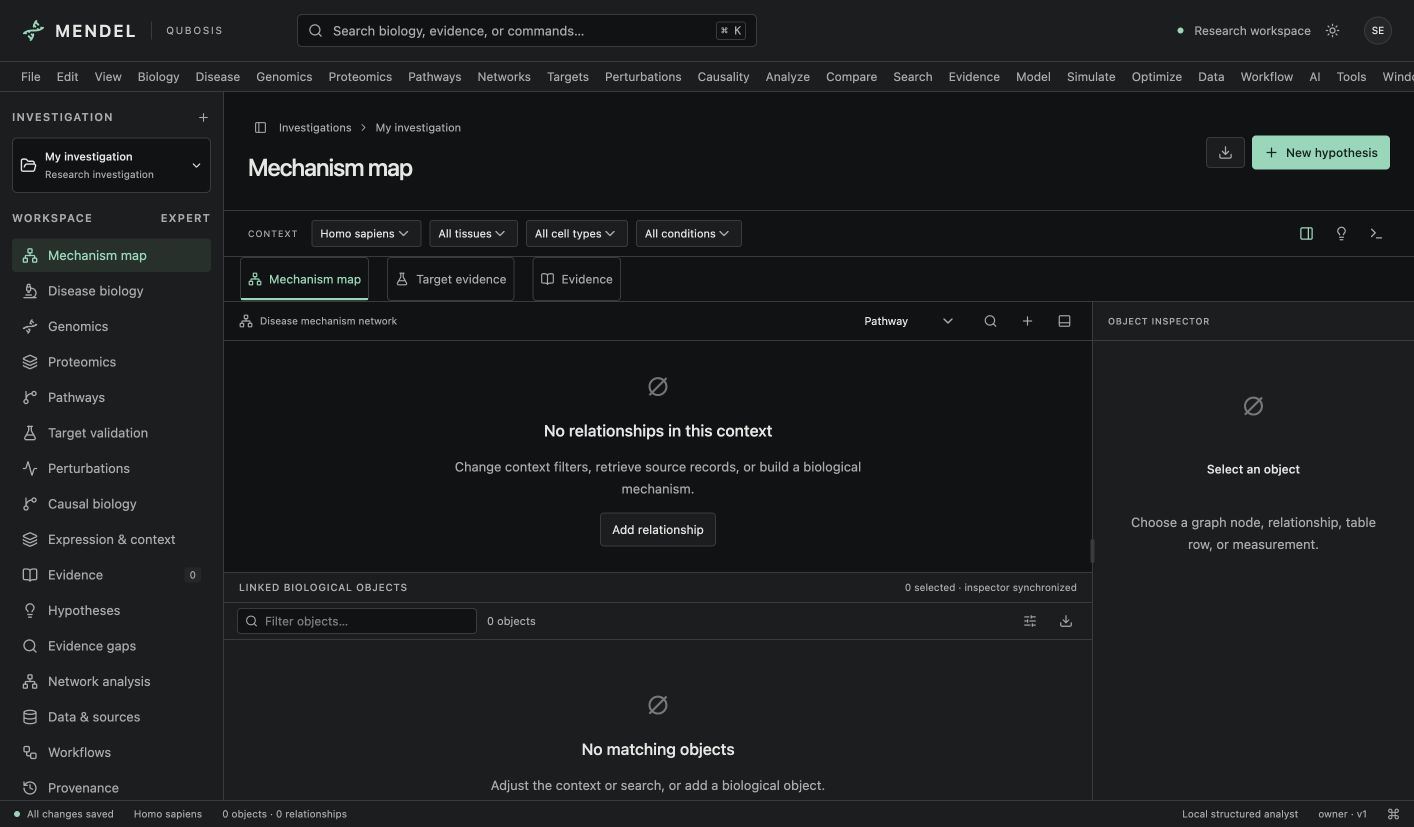
Explore biological networks
Navigate typed relationships between diseases, genes, proteins, pathways, and targets. Filter by evidence and context.
RESEARCH & EVIDENCE / BIOLOGICAL INTELLIGENCE

See the biology between the dots.
Investigate disease mechanisms through connected biological entities, pathways, and target evidence. Mendel helps researchers explore relationships and turn open questions into testable hypotheses while keeping evidence and biological context visible.
01 / OVERVIEW
Investigate disease mechanisms through connected biological entities, pathways, and target evidence. Mendel helps researchers explore relationships and turn open questions into testable hypotheses while keeping evidence and biological context visible.
The sections below describe the product capabilities, use cases, system requirements, and documented workflow in the source application.
02 / FEATURES
This inventory explains what each capability does, which records and decisions it touches, and where its scientific or operational boundary applies. External services and unavailable engines are identified as such.
Navigate typed relationships between diseases, genes, proteins, pathways, and targets. Filter by evidence and context.
Review supporting sources, missing evidence, and competing hypotheses without flattening everything into a universal score.
Explore qualitative signed perturbations, compare conditions, and preserve assumptions behind a proposed experiment.
Record species, disease, tissue, cell type, and condition alongside entities and evidence. Filter graph exploration and perturbation views by context so human, animal, cell-line, and biochemical observations remain distinct instead of being silently combined.
Represent diseases, phenotypes, genes, proteins, pathways, experiments, omics observations, and questions with stable IDs and source references. Relationship types distinguish association, mechanism, causality, and hypothesis; endpoint rules reject invalid links while leaving scientific interpretation to the researcher.
Inspect directional neighborhoods, bounded shortest paths, connected components, regulatory feedback, and deterministic network layouts. Degree, betweenness, closeness, and eigenvector measures describe the loaded graph projection and its coverage; they are exploratory diagnostics, not a universal biological target score.
Review human genetics, mechanism, cellular evidence, animal evidence, expression, and compensation separately. Inspect compatible study groups, contextual mismatches, supporting records, and conflicts instead of collapsing evidence into a single opaque number.
Identify missing evidence dimensions and create qualitative questions or proposed experiments intended to discriminate between explanations. These templates organize the next discussion; the app does not compute information gain, prescribe a protocol, or claim that an experiment will prove a target.
Propagate a qualitative intervention sign over supported signed mechanistic or causal edges. Preserve ambiguous effects, opposing routes, and possible bypass paths; paired interventions can suppress explicitly blocked compensators in the exploratory model.
Import bounded CSV or TSV feature, sample, condition, value, and unit records. Explore condition means, descriptive differences, heatmaps, and annotated network overlays while retaining units and context; no normalization or inferential testing is implied.
Request bounded, cached records from UniProt, Ensembl, Reactome, and Open Targets with source metadata and retrieval provenance. Inspect returned fields and reconcile records explicitly; provider annotations describe a source record and do not themselves validate a disease-specific target.
Persist investigation revisions, comments, annotations, snapshots, undo/redo, restore, and import/export. Attach private files with hashes and choose which selected context is available to an analyst or handoff; recover from concurrent edits by reconciling against the saved revision.
Use the deterministic analyst to resolve selected entities, retrieve claims, and summarize recorded evidence gaps. Optional remote model analysis requires explicit context selection and per-request consent; model text remains unreviewed inference until checked and accepted by a researcher.
03 / SYSTEM REQUIREMENTS
Node.js 22.13 or newer and npm. Local application state uses the configured Workers D1-compatible development environment.
Run `npm ci`, apply the local migrations with `npm run db:migrate:local`, and start with `npm run dev`. Create an investigation after opening the loopback URL printed in the terminal.
04 / USE CASES
These examples show how the product’s implemented tools can be combined. They describe workflows, not guaranteed scientific outcomes.
Map candidate mechanisms for a disease or phenotype across genes, proteins, and pathways.
Review target evidence and missing context before proposing an experiment.
Compare biological networks across tissue, cell, species, or condition filters.
Capture qualitative perturbation scenarios and competing hypotheses for a research meeting.
Compare a human disease mechanism with animal, cell-line, and biochemical evidence while preserving each context label.
Inspect a candidate target's genetic, mechanistic, cellular, animal, expression, and compensation evidence side by side.
Identify a missing discriminating link and draft a qualitative experiment that separates two competing pathway explanations.
Compare two uploaded omics conditions descriptively and overlay selected observations on a context-filtered mechanism map.
05 / DOCUMENTATION
A detailed operating manual from first setup through advanced analysis, review, collaboration, and export. Each section explains the records to prepare, the steps to take, how to read the result, and what remains outside the implemented product.
A guide to the sequence of work in Mendel. Steps can require review or configured services before continuing.
FIND YOUR NEXT STEP
16 of 16 chapters
FOUNDATIONS
Mendel is a biological intelligence workstation for asking how entities and mechanisms relate within a specific context. Before exploring a graph, record the species and any relevant disease, phenotype, tissue, cell type, condition, or timepoint. Context changes how a relationship should be interpreted and should travel with the hypothesis.
Start a blank investigation when the question is yours. The built-in reference investigation is an illustrative starting point; its graph simplifications and reviewer-assessed evidence strength are not validated findings. Keep reference material separate from your own evidence and make the source status clear to collaborators.
FOUNDATIONS
Use Data & sources to find supported biological records and inspect their source metadata before importing them. Public connectors can access UniProt, Ensembl, Reactome, and Open Targets when configured and connected. Each returned record should be checked for identity, species, source date, and the field that actually supports the link you are examining.
Import measurements as CSV or TSV with feature, sample, condition, value, and unit columns. Review the accepted column mapping before running any analysis. Keep the source file and its citation available; an entity match is not the same as evidence for a disease mechanism or target effect.
Name the question and select the species and contextual filters that shape the biological interpretation.
Search a connected data source or import a supported measurement table. Confirm record identity and provenance.
Open the relationship inspector and review type, direction, evidence, and contextual qualifiers.
Capture a snapshot before changing the graph or starting a new hypothesis branch.
FOUNDATIONS
Mendel's graph represents typed entities and relationships. Use direction-aware neighborhoods and paths to follow a proposed mechanism, then apply evidence, class, and context filters to reduce the display to the relevant slice. The interface includes multiple graph layouts and network metrics; layout distance is a visual aid, not measured biological distance or interaction strength.
Open an edge or node in the inspector rather than relying on a label alone. Compare the source records and evidence context for each connection. Distinguish imported facts, manually linked hypotheses, and relationships inferred or summarized by tools, because those have different evidentiary status.
FOUNDATIONS
The target evidence workspace keeps evidence dimensions separate. Inspect supporting source groups, conflicting reports, missing evidence, contextual fit, and proposed experiments. A single score can hide which evidence is absent or conditional, so Mendel avoids treating a target ranking as a universal conclusion.
Use the hypotheses view to record a competing explanation or a question that would distinguish two mechanisms. If a source contradicts the preferred path, preserve it and explain the disagreement rather than excluding it without a reason. A good review record should make it possible to understand why the target remained interesting and what remains uncertain.
FOUNDATIONS
A signed perturbation scenario lets a researcher ask how a stated increase or decrease might propagate through a simplified signed network. Define the intervention, inspect possible compensation, and retain unknown edges and assumptions. Compare conditions only after confirming that the same mechanism and context apply to both.
These scenarios are qualitative research aids. They do not simulate physiology and do not predict clinical efficacy. Use them to make a line of reasoning explicit, generate possible experiments, and surface evidence gaps. Record the scenario with its context and review it with a domain expert before using it to prioritize experimental work.
FOUNDATIONS
Mendel supports persistent investigations, immutable revisions, optimistic concurrency, annotations, snapshots, restore, import, export, and Qubosis handoffs. Save important points before larger changes and inspect the diff when revisiting a hypothesis. Attachments are private and hashed; back up attachment bytes in addition to exported structured records.
Exports can include reports, object tables, graphs, and handoff packages. Review the export classification and source metadata before sharing. If using a reference investigation, preserve its illustrative label and do not present its sample measurements, evidence scores, or graph simplifications as experimental observations.
WORKING IN DEPTH
Before adding records, state the biological question and the context in which it applies. Species, disease, tissue, cell type, and condition can change the interpretation of the same entity or edge. Set the context bar deliberately and decide whether unspecified values should be included; the application does not silently treat unspecified species as human.
Use a new investigation for a substantially different question or context. The bundled EGFR/MET reference is illustrative even though it links to real literature. Its selected relationships and evidence strengths are reviewer-assessed examples, not a comprehensive disease model. Keep demo content separate from research records and use a blank investigation for your own source review.
WORKING IN DEPTH
Create or import entities with stable IDs, type, identifiers, context, provenance, confidence, and version. Rich attributes can preserve source-specific coordinates, variants, transcripts, domains, isoforms, modifications, and experimental metadata. Add typed relationships only when the endpoints satisfy the domain constraints, and cite the records behind each scientific assertion.
Use Association when the records establish a relation but not a mechanism. Use Mechanistic, Causal, or Hypothesis classifications only when the intended meaning is clear and the supporting evidence is recorded. A valid source reference proves that a record exists in the workspace; it does not prove that the source entails the biological claim. Preserve rejected evidence so the decision remains visible, and exclude it from evidence-backed graph filters.
Use stable Mendel IDs or provider accessions; resolve ambiguous gene and protein symbols.
Record source, context, version, and evidence references for every imported or manually entered object.
State whether a link is associative, mechanistic, causal, or a hypothesis and preserve its rationale.
WORKING IN DEPTH
Neighborhood and path tools make traversal direction explicit: upstream, downstream, or both. Shortest paths are unweighted and show connectivity, not causal strength. The visible graph is bounded; when it reaches its node limit, inspect the truncation notice before drawing conclusions about disconnected or missing biology.
The network panel can report degree, Brandes betweenness, closeness, iterative eigenvector centrality, connected components, and deterministic label-propagation modules on the loaded graph projection. These metrics depend on which objects and evidence passed the filters. Use them to select records for inspection, not to rank therapeutic value or to claim that a highly connected node is functionally essential.
WORKING IN DEPTH
Target validation separates human genetic, mechanistic, cellular, animal, expression, and compensation evidence. Each dimension retains its records, qualitative strengths, independent study-group annotations, and context mismatches. The displayed summary follows a transparent rule for the strongest compatible reviewer label while keeping conflicts visible; it is not a calibrated meta-analysis.
Inspect which sources contribute to each dimension and whether they refer to the selected disease, tissue, cell, and condition. A source can establish a database annotation without establishing a target in a particular disease. Missing dimensions are shown as gaps, not converted into a negative score. Suggested experiments are qualitative templates for resolving a gap and do not calculate expected value of information or laboratory outcomes.
Mark or open the target entity and review its context and identifier.
Check source groups, conflicting evidence, missing records, and contextual mismatches separately.
Describe a discriminating test and which unresolved evidence dimension it addresses.
WORKING IN DEPTH
Perturbation Studio starts from a qualitative intervention sign and follows supported signed mechanistic or causal edges. Inhibitory edges reverse the sign; unknown regulation remains ambiguous. Associations are not converted into effects, and opposing routes produce ambiguity instead of a numerical average. The bounded traversal avoids implying that a long path is a quantitative prediction.
Possible compensation is an annotated bypass hypothesis, not proof of pathway activation. Paired interventions can suppress explicitly selected compensators to compare the graph result, but the engine has no fitted kinetics, dose, concentration, time integration, response distribution, viability estimate, or drug-synergy score. Empty propagation means the graph lacks sufficient supported connectivity; it does not prove no biological effect exists.
Select the entity, sign, and context; do not invent a magnitude or dose.
Inspect edge type, evidence, sign reversals, and ambiguity along propagated routes.
Block an explicitly named compensator and retain both scenario versions and assumptions.
WORKING IN DEPTH
CSV and TSV imports use a `feature,sample,condition,value,unit` schema, with optional tissue and cell metadata. Values must be finite and units are preserved. An exact Mendel object ID takes precedence; ambiguous gene and protein symbols are rejected so a measurement cannot attach to the wrong biological entity by accident.
The current interactive measurement workflow provides condition means, descriptive differences, heatmaps, and network comparisons. It does not normalize batch effects, perform hypothesis tests or multiple-testing correction, cluster single cells, register spatial omics, or infer causality. Expression abundance is not functional importance. Keep the assay, unit, context, and missingness in view, and use an external validated pipeline for full-scale omics analysis.
WORKING IN DEPTH
Public adapters retrieve bounded records from UniProt, Ensembl, Reactome, and Open Targets. They include provider provenance, explicit species, cache behavior, and source-specific limits. UniProt supplies reviewed protein annotations; Ensembl can include transcripts and translations; Reactome supplies pathway metadata; Open Targets supplies bounded disease associations while aggregate scores are not reused as target-validation metrics.
When refreshing an identifier, compare new fields with the saved entity and reconcile changes explicitly. Do not silently overwrite a researcher-authored value with a provider response. Inspect citation and license notes before exporting or redistributing imported material; a public endpoint does not grant a blanket redistribution license. Other registry entries may be extension points rather than live data connectors.
WORKING IN DEPTH
Use Hypotheses to keep a mechanistic explanation, alternatives, predictions, tests, and supporting or opposing evidence together. Add private research attachments with hashes, then selectively include only the files needed for a chosen context. CSV/TSV observations can feed the measurement views; raw files remain distinct from structured scientific records.
Snapshots preserve the investigation state. Restore can replay a recorded scientific revision as a new revision, while an open-view restore can return context filters and selection. Imports preserve the source project's identity and do not rewrite its history. Export a report, object table, graph, research package, or Qubosis handoff after checking which original attachment bytes must travel separately.
WORKING IN DEPTH
The deterministic biological analyst resolves selected entities or names, retrieves source claims already recorded in the investigation, and describes evidence dimensions, gaps, and annotated compensation. Its output is structured retrieval from the workspace rather than unrestricted natural-language biological reasoning. Optional model configuration can interpret selected context only after consent for that request; attachments are opt-in.
Model assertions are marked as unreviewed inference. Citation-ID validation checks that a reference exists, not that it supports the claim. Project ownership, editor/viewer roles, optimistic concurrency, and conflict recovery help teams work on persistent records. If a revision conflict occurs, copy any unsaved local text, reload the saved revision, compare the changes, and reconcile instead of forcing an overwrite.
WORKED EXAMPLE
A researcher asks whether a proposed bypass route could be relevant in a particular disease and cell context. They create a blank Mendel investigation, set species, disease, tissue, cell type, and condition, then import supported entities and source-linked pathway records. The investigator distinguishes association from mechanistic and causal links, attaches evidence to each edge, and checks that the records match the selected context. The bundled EGFR/MET reference can illustrate the interface, but its graph strengths and simplified relationships remain labeled illustrative.
The researcher opens the target-evidence matrix to inspect genetics, mechanism, cellular, animal, expression, and compensation dimensions separately. If one dimension is missing, an evidence-gap template helps formulate a discriminating experiment. A qualitative perturbation can propagate a signed effect through supported edges, but ambiguous routes stay ambiguous and possible compensation stays a hypothesis. The result guides a discussion about what evidence to seek; it does not simulate pathway kinetics or predict a clinical response.
Choose organism, disease, tissue, cell, and condition before loading entities.
Record typed edges with source passages and keep unsupported links out of causal categories.
Review each target dimension, context mismatch, conflict, and independent-source annotation.
Run a bounded perturbation, inspect ambiguous paths, and save the assumptions with the scenario.
KEEP THIS CLOSE
Typed biological entities, context labels, source-linked relationships, supported public records, and bounded measurement tables.
Context-filtered mechanism maps, target evidence dimensions, qualitative perturbation scenarios, hypotheses, reports, and snapshots.
Check species and tissue compatibility, relationship classification, evidence references, rejected sources, and ambiguous effects before interpreting a path.
TERMS IN CONTEXT
WHEN SOMETHING NEEDS ATTENTION
Use the exact Mendel object ID or provider accession. A shared gene/protein symbol cannot safely identify a measurement endpoint.
Inspect context filters, supported signed edges, direction, and traversal limits. Empty connectivity does not prove absence of a biological effect.
Preserve unsaved text, reload current state, compare the other edit, and reconcile against the saved revision.
06 / SCOPE AND LIMITS
Mendel's perturbation views are qualitative research aids, not physiological simulations or validated predictions of efficacy. Its reference graph contains illustrative simplifications.
Confirm the current capability state in the application before starting work. A planned operation, a generated preview, or a queued job should not be described as a validated scientific result.
SEE MENDEL IN CONTEXT
Request a walkthrough with the Qubosis team.


