 qubosis
Follow scientific lineage
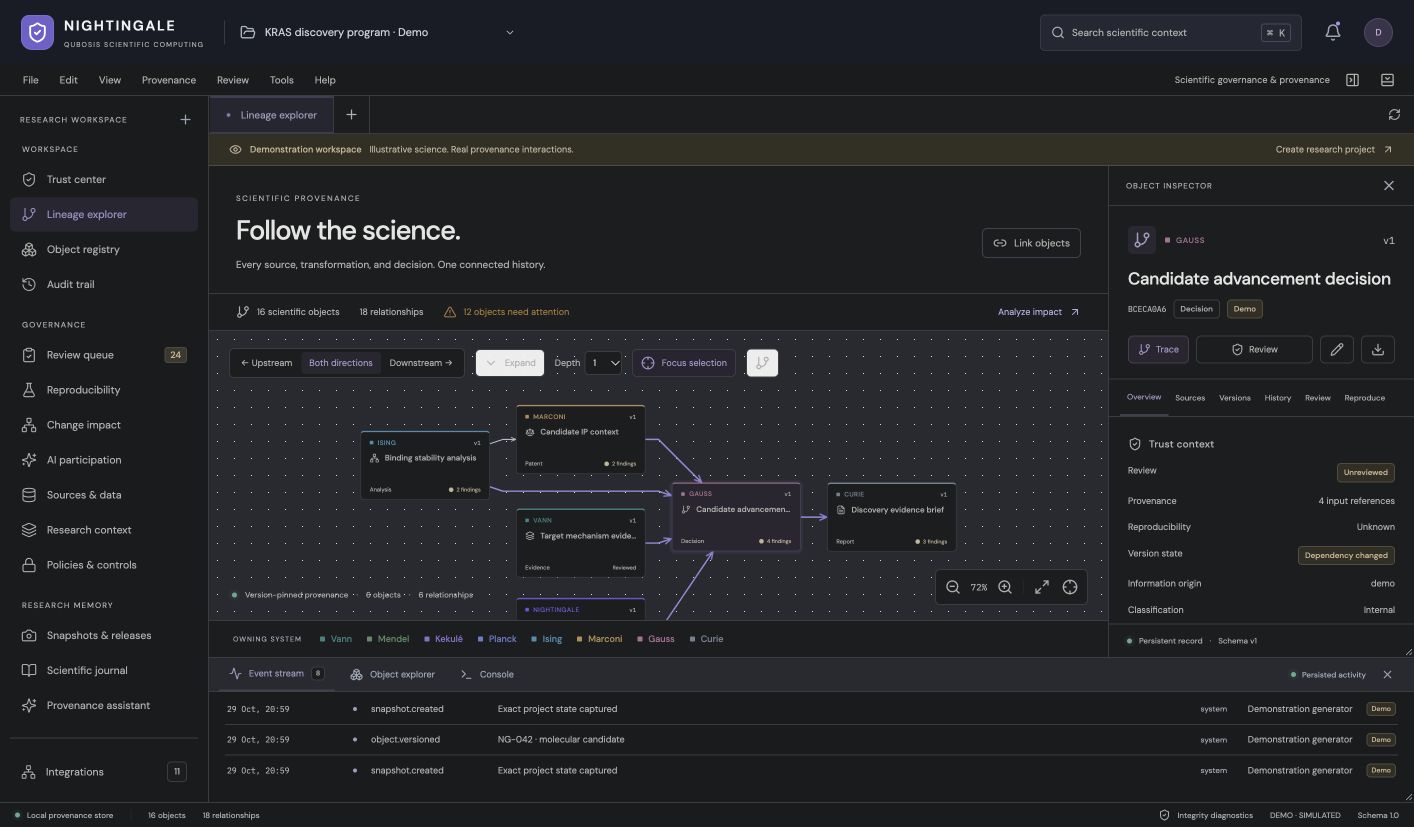
Register objects and trace version-pinned relationships upstream and downstream through a linked graph.
ANALYSIS & COMMUNICATION / PROVENANCE & GOVERNANCE

Every result has a story. Keep it.
Record the identities, versions, reviews, and dependencies behind scientific work. Nightingale helps teams inspect how a result came to be and what could change its context, with version-pinned lineage and review records.
01 / OVERVIEW
Record the identities, versions, reviews, and dependencies behind scientific work. Nightingale helps teams inspect how a result came to be and what could change its context, with version-pinned lineage and review records.
The sections below describe the product capabilities, use cases, system requirements, and documented workflow in the source application.
02 / FEATURES
This inventory explains what each capability does, which records and decisions it touches, and where its scientific or operational boundary applies. External services and unavailable engines are identified as such.
Register objects and trace version-pinned relationships upstream and downstream through a linked graph.
Record checklists, evidence, and dispositions. Detect dependency drift and changed scientific context.
Capture snapshots, inspect audit history, and export frozen states with supplied artifacts and fingerprints.
Register objects with stable global IDs, domain identifiers, explicit origin, classification, and scientific context. Preserve source identity and version so a lineage edge can refer to the exact object state used downstream.
Trace upstream and downstream relationships through an interactive graph and universal inspector. Manually linked and inferred edges remain distinguishable, and typed relationships can be reviewed against the object versions they connect.
Change objects with a reason while retaining previous versions and structured field differences. Fork, archive, restore, and reconstruct historical object, relationship, and review state without erasing the recorded history.
Attach checklists, evidence checked, reviewer, and disposition to an exact object version. Updating scientific context resets current review state so an earlier decision is not silently carried onto a changed record.
Inspect stale dependencies, downstream impact, freshness, incomplete execution context, missing outputs, AI participation, plan/actual deviations, and possible duplicate identities across documented reproducibility dimensions.
Capture immutable project snapshots, compare them, apply release policy, and export frozen project state with supplied artifacts and SHA-256 fingerprints. Current and historical restricted classifications are checked during export.
Filter audit records by object, actor, action, text, and capture time. Inspect before/after payloads and export filtered history for an internal reproducibility review.
Manage administrator, scientist, reviewer, and viewer roles at the project boundary. Membership revocation takes effect on the next request; object classification affects export handling rather than acting as a separate object ACL.
Accept product-scoped events using stable retry IDs, atomic object/link/event writes, duplicate detection, failure diagnostics, and separate source-reported and capture timestamps.
Use the project journal, source inventory, AI-participation inventory, assumption and uncertainty registry, notifications, watchlist, command palette, and deterministic provenance queries in the safe scientific console.
Retain attached file bytes and SHA-256 fingerprints, then include supplied artifacts in structured manifests. File checksums help detect change but do not prove that the content is scientifically valid or storage is tamper-proof.
03 / SYSTEM REQUIREMENTS
Node.js 22.13 or newer (Node 24 LTS recommended), npm, and local SQLite persistence. Production needs the team's own hosting, backup, and retention setup.
Run `npm ci` and `npm run dev`; the local service binds to loopback and creates a clearly labeled demo investigation. Use `npm run build` and `npm start` for a production build. Create a local account and project for your own records.
04 / USE CASES
These examples show how the product’s implemented tools can be combined. They describe workflows, not guaranteed scientific outcomes.
Register research objects from multiple teams with stable identities and source context.
Trace upstream dependencies and inspect what changes when a source version is updated.
Record a checklist and reviewer disposition against the exact version under review.
Create a frozen project snapshot and audit trail for internal reproducibility handoffs.
Trace a reported figure back through its dataset, analysis, source objects, versions, and review record.
Identify which downstream objects need re-review after an upstream method or source version changes.
Capture a point-in-time project snapshot, compare revisions, and export an integrity-manifested handoff.
Search the audit trail for a specific object, actor, action, or capture interval and inspect the before/after state.
Ingest authenticated events from a product integration while deduplicating safe retries and preserving source timing.
05 / DOCUMENTATION
A detailed operating manual from first setup through advanced analysis, review, collaboration, and export. Each section explains the records to prepare, the steps to take, how to read the result, and what remains outside the implemented product.
A guide to the sequence of work in Nightingale. Steps can require review or configured services before continuing.
FIND YOUR NEXT STEP
18 of 18 chapters
FOUNDATIONS
Nightingale is a provenance, reproducibility, review, and governance workstation. It records scientific identity and versioned context around work performed in its owning product; it is not itself a scientific computation engine. Start with stable IDs and clear project membership so each record can be followed back to its source and owner.
The first local investigation is a clearly labeled demonstration. Create a local account and research project for your own science. Keep the demonstration separate from production evidence and preserve the distinction between imported facts, manually linked relationships, and inferred links.
FOUNDATIONS
Register scientific objects with stable global IDs, domain identifiers, source origin, classification, context, and a specific version. Link their dependencies upstream and downstream so a reviewer can see which data, methods, or product records contributed to a result. The lineage explorer distinguishes manually linked from inferred relationships.
Open the universal inspector for an object before relying on the graph. Confirm the current version, source context, status, and the exact dependency edges. A graph layout communicates connectivity, not quantitative influence or proof that a result can be reproduced.
Set up the project and membership boundary for the team that owns these records.
Capture its stable identity, domain ID, origin, classification, context, and version.
Create version-pinned relationships and label manually entered or inferred links.
Trace upstream and downstream neighbors before a context or version changes.
FOUNDATIONS
Use Review Queue to attach a checklist, evidence checked, and a disposition to an exact object version. Record the reviewer and the reason for the decision. When scientific context changes, the current review state resets so an old approval is not silently carried over to a new version.
Review is a recorded judgment about a defined version, not proof that a result is correct. Inspect incomplete execution context, missing outputs, AI participation, assumptions, uncertainty, and possible duplicates when those dimensions apply. Keep the evidence consulted with the review so a later team can understand its scope.
FOUNDATIONS
When an upstream object changes, use dependency drift and impact views to identify downstream records that may need review. Compare the new dependency version with the pinned version used by each analysis or report. Do not automatically rebind a result to a newer source without checking whether the change affects its scientific meaning.
Nightingale exposes reproducibility dimensions and possible freshness issues. Use them as prompts for a human review, not as a single trust score. If a dependency is missing, stale, or unavailable, keep that status visible and explain whether it blocks the intended reuse.
FOUNDATIONS
Search audit events by object, actor, action, text, and capture time. Inspect before-and-after records for the change you care about. The audit trail can support internal review by making application events easier to follow; it does not guarantee that the underlying database has never been altered.
Capture immutable project snapshots when a state needs to be frozen. Compare snapshots to identify changes and apply release policies appropriate to the project. Export frozen states with the supplied files and SHA-256 fingerprints, then check the manifest and classification restrictions before sharing.
FOUNDATIONS
Project membership supports administrator, scientist, reviewer, and viewer roles. Membership changes take effect on the next request. Object classifications affect export handling; they are not a separate object-level access-control system. Accounts in a local instance are not externally identity-verified.
Local hashes and append-only application records detect or resist ordinary application-level changes but are not tamper-proof against a database administrator. Retention settings are advisory and automatic purge is not implemented. Before production use, configure backups and retention, review authorization boundaries, and plan for the operational scale of the graph.
WORKING IN DEPTH
The repository implements a local governance service and workstation. Live product connections, scientific computation, wet-lab execution, external AI generation, SSO, externally anchored signatures, and regulatory certification are not configured. Its deterministic provenance assistant runs documented graph queries and labels its behavior accordingly.
The current server evaluates the selected project's graph locally. Million-node operation requires a different graph projection and worker infrastructure and has not been validated. Treat Nightingale as a practical local recordkeeping and review layer whose controls need independent operational and scientific assessment before regulated or high-scale deployment.
WORKING IN DEPTH
Nightingale is a provenance, reproducibility, review, and governance workstation. Create a project for the group of records that shares an ownership and review boundary. Register an object with a stable global ID, domain identifier, source origin, classification, and scientific context so downstream systems can refer to it without relying on a display name.
The initial local investigation is demonstration data. Create a fresh project for real work and distinguish imported source records, manually entered relationships, and inferred links. Classification helps control export handling; it is not an object-level access policy. Do not use an illustrative record as a validated scientific result.
WORKING IN DEPTH
Create relationships that identify the upstream data, method, or product object on which a downstream result depends. Pin edges to versions and label a relationship as manually linked or inferred. Use the interactive graph to navigate neighbors and the universal inspector to check object identity, source context, current version, and relationship details.
A lineage graph displays recorded dependency and identity relationships; its layout does not represent measured influence or guarantee reproducibility. If the graph truncates a neighborhood or a source is missing, inspect the notice and use the record search or API to find the complete object set. Keep an explicit source citation for any relationship that carries scientific meaning.
Capture the stable ID, version, origin, context, and classification.
Connect the exact source version to its derived object and label link origin.
Trace both directions to see the records that rely on or feed the selected object.
WORKING IN DEPTH
When an object changes, enter a reason and create a new immutable version. The system retains earlier versions and structured field diffs so reviewers can see what was added, removed, or changed. Fork an object when you need to explore an alternative, archive an obsolete line of work, or restore historical state according to the project workflow.
A new version can change scientific context and invalidate an earlier review. Do not update labels in place to make a record appear unchanged. Inspect the source and derived-object links after each revision so downstream teams know whether they need to rerun, rebind, or review their work.
WORKING IN DEPTH
The review queue attaches a checklist, evidence checked, reviewer, and disposition to an exact object version. Record the scope of the review and any exceptions. If the scientific context changes, the current review state resets so a prior approval is not silently applied to a new object state.
Review is a recorded human judgment about a defined version, not proof of scientific truth. Consider assumptions, uncertainty, AI participation, missing outputs, execution context, and plan-versus-actual deviations where relevant. Keep the evidence used in the review accessible so another person can assess the disposition without reconstructing the reviewer’s memory.
Confirm object ID, revision, source, and context before opening the review.
Record evidence inspected and explain any incomplete or out-of-scope items.
Record reviewer identity, decision, and rationale against that version.
WORKING IN DEPTH
When a dependency version changes, use drift and impact views to identify downstream records that may need review. Compare the new upstream state with the version pinned by a result or report. A freshness warning should prompt a human assessment; it does not prove the downstream result is wrong or automatically recompute it.
The reproducibility assessment covers documented dimensions such as missing dependencies, freshness, incomplete execution context, AI participation, output availability, and deviations between plan and actual execution. Treat these as separate diagnostics. A single completeness label cannot certify that a scientific result is reproducible, and an absent dependency must remain explicit rather than being silently rebound to the newest version.
WORKING IN DEPTH
Create an immutable snapshot when a project state needs to be frozen for an internal review or handoff. Compare snapshots to identify changed objects, relationships, reviews, or artifacts. Use the release policy to decide whether the current classifications and completeness state permit export, and record the policy and reviewer responsible for the release.
Exports include frozen project state and supplied artifacts with a structured manifest and SHA-256 fingerprints. Restricted classifications in current and historical state are checked during export. A manifest can show which objects and files were included; a fingerprint can detect changed bytes but cannot guarantee that an administrator has not modified the database or that the science is correct.
WORKING IN DEPTH
Search audit events by object, actor, action, text, and capture time. Open a record to compare its before and after state and export a filtered audit history. Source-reported event timing and local capture time are recorded separately so delayed integration delivery does not rewrite when an upstream system says an event occurred.
The project journal, source inventory, AI-participation inventory, assumption and uncertainty registry, notifications, and watchlist provide different views into research activity. Use the journal for sequence and context, the source inventory for origin, and audit search for change events. A complete audit log is useful evidence for review but is not itself tamper-proof storage.
WORKING IN DEPTH
Project membership supports administrator, scientist, reviewer, and viewer roles. Access is enforced at the project boundary, and revocation takes effect on the next request. Accounts authenticate to the local instance but are not externally identity-verified. External SSO is not configured in the repository, so deployers need to review their identity and access requirements separately.
Product integrations send authenticated, product-scoped event objects with stable retry IDs. Nightingale can write objects, links, and event records atomically, detect duplicates, and report failure diagnostics. Check the product scope, project, object versions, and source timestamp in the integration response. A successful ingestion records provenance; it does not execute scientific computation or independently validate the event's scientific statement.
WORKING IN DEPTH
The command palette and scientific console provide bounded domain queries rather than arbitrary shell access. The provenance assistant runs deterministic graph queries and identifies its behavior accordingly. It does not execute product jobs or generate scientific conclusions. The API and SDK can support integrations; authenticate them with scoped credentials and preserve stable object and event identifiers.
Original attachments preserve their bytes and checksums within documented per-file limits. Back up the SQLite database and associated artifacts together, and test restore procedures. Retention settings are advisory and automatic purge is not implemented. The current server evaluates the selected project's graph locally; million-node scale requires different projection and worker infrastructure and has not been validated.
WORKING IN DEPTH
Append-only application events and SHA-256 fingerprints can detect or resist ordinary application-level changes. A database administrator can still alter local storage, and no externally anchored signature service is configured. These controls should be described as integrity aids, not as tamper-proof audit evidence.
Nightingale is not a regulatory certification, validated electronic-signature system, or guarantee of scientific reproducibility. Live product connections, computation, wet-lab execution, external AI generation, SSO, automatic retention purge, and regulatory certification are not configured. Before production use, review authentication, backups, classification policy, operational capacity, and independent security or scientific validation.
WORKED EXAMPLE
A team registers a figure as a scientific object and links it to the visualization version, analysis record, dataset version, and the original source files. Each relationship is pinned to the version used. The team then records a review checklist for the figure and its sources, including the reviewer, evidence inspected, assumptions, and disposition. A project snapshot freezes the state the team discussed at its review meeting.
Later, a dataset source receives a new version. Nightingale's drift view traces downstream links and marks the figure for a human review. The team compares the new source against the pinned one, decides whether the previous analysis still applies, and either preserves the old figure or registers a new one with new lineage. Audit search can show who changed the source link and when. This process makes changes visible; it does not automatically rerun analysis or certify the figure's scientific validity.
Create stable records and pin each edge to the exact dataset, method, and figure revision.
Attach a version-specific checklist and freeze the discussed project state.
Inspect drift, compare source versions, and determine which downstream records need re-review.
Export the snapshot, included artifacts, manifest, and filtered change history.
KEEP THIS CLOSE
Scientific object IDs and versions, source origins, classifications, dependency links, artifacts, reviews, and authenticated integration events.
Versioned lineage, field diffs, review dispositions, drift and reproducibility diagnostics, audit history, snapshots, and manifests.
Check identity, pinned dependencies, current context, missing artifacts, classification, review scope, and release policy before export.
TERMS IN CONTEXT
WHEN SOMETHING NEEDS ATTENTION
Compare scientific context and version changes. A prior disposition does not automatically apply to revised records.
Inspect project scope, token permissions, stable retry ID, schema, and duplicate diagnostics. Preserve the original source timing.
Review release policy and current or historical restricted classifications, then resolve the precise blocking condition.
06 / SCOPE AND LIMITS
Nightingale records provenance and review; it does not certify scientific truth or regulatory compliance. Local hashes are not tamper-proof storage, and external identity, SSO, and live product connectors are not configured.
Confirm the current capability state in the application before starting work. A planned operation, a generated preview, or a queued job should not be described as a validated scientific result.
SEE NIGHTINGALE IN CONTEXT
Request a walkthrough with the Qubosis team.


