 qubosis
Define what matters
Import evidence and candidates, then specify objectives while retaining units, directions, and weights.
ANALYSIS & COMMUNICATION / DECISION INTELLIGENCE

Make the trade-offs visible.
Bring candidates, objectives, and uncertainty into a reproducible decision workspace. Gauss helps compare scientific options with explicit methods and inspectable assumptions, so a ranked list remains connected to the evidence that produced it.
01 / OVERVIEW
Bring candidates, objectives, and uncertainty into a reproducible decision workspace. Gauss helps compare scientific options with explicit methods and inspectable assumptions, so a ranked list remains connected to the evidence that produced it.
The sections below describe the product capabilities, use cases, system requirements, and documented workflow in the source application.
02 / FEATURES
This inventory explains what each capability does, which records and decisions it touches, and where its scientific or operational boundary applies. External services and unavailable engines are identified as such.
Import evidence and candidates, then specify objectives while retaining units, directions, and weights.
Use deterministic decision methods to rank candidates and examine uncertainty and competing objectives.
Retain method versions, inputs, assumptions, and provenance alongside analyses and exports.
Persist the question, decision model, objectives, candidates, evidence, assumptions, scenario branches, analyses, decisions, reviews, approvals, attachments, snapshots, and hash-linked provenance events as inspectable records.
Load supported candidate and measurement records with units, source versions, shared-source identifiers, evidence types, and context. Keep conflicts and source dependence visible so the same underlying source is not silently counted as independent support.
Define which measurements matter, whether higher or lower values are preferred, their units, weights, and explicit feasibility constraints. Inspect normalization and missing-data behavior before running a method.
Compare supported weighted, constraint-first, evidence-weighted, probabilistic, Pareto, robustness, and dependency analyses. The method version, seed, input values, and units stay attached to each result for repeatable review.
Explore contribution uncertainty, candidate stability, source dependence, conflicts, and the effect of excluding one source group. Review the assumptions and exact evidence included in each analysis instead of treating a point score as certainty.
Inspect nondominated candidates across multiple objectives and explore how a ranking changes as objective weights vary. Sensitivity warnings help identify fragile regions; they do not select a preferred trade-off on the team's behalf.
Run formal value-of-information analyses and preserve their input manifests and result-specific detail panels. Attribute a proposed next action to its evidence and method; missing or weak action inputs remain a visible limitation.
Branch a scenario to compare changed assumptions, candidate subsets, or objective settings while retaining the base case. Typed object edges, project history, and a lazy-loaded graph help trace how records relate.
Record human reviews, comments, overrides, rationales, and approvals against a versioned result. A point ranking is not automatically an approved decision; human authority and the decision state remain separate.
The AI gateway can interpret a minimized, selected context and operate approved application tools, but deterministic methods own numeric results. Validate citations, inspect context manifests, and approve consequential mutations before they change scientific state.
Use domain commands in the safe scientific console without shell access. Long-running robustness analyses expose job state and progress in the workspace, and reproducibility snapshots retain the records needed to inspect a run.
Attach and preview supported evidence with anchored text, retain checksums, save version-pinned bookmarks and named context groups, and inspect hash-linked provenance and restore behavior.
03 / SYSTEM REQUIREMENTS
Gauss uses a pnpm web workspace and Python API. Local development can use SQLite and filesystem storage; production uses Docker Compose with PostgreSQL, Redis, MinIO, and an OIDC provider.
For a lightweight local run, copy `.env.example` to `.env`, run `make install`, then start the API with `make api` and the web app with `pnpm --filter @gauss/web dev`. Production-oriented local topology uses `docker compose up --build`.
04 / USE CASES
These examples show how the product’s implemented tools can be combined. They describe workflows, not guaranteed scientific outcomes.
Prioritize experimental candidates against multiple explicit criteria.
Compare options where measurements use different units or have different directions of preference.
Explore Pareto trade-offs and the sensitivity of a ranking to objective weights.
Create an audit-ready comparison whose method, inputs, uncertainty, and assumptions remain available.
Prioritize experimental candidates against multiple objectives with unit-aware evidence and explicit feasibility constraints.
Compare a weighted ranking with constraint-first, evidence-weighted, probabilistic, or Pareto views to expose different decision assumptions.
Find out whether one source group or one objective weight is driving a preferred candidate through leave-one-source-out and sensitivity analyses.
Estimate whether additional evidence could change the decision with an explicit value-of-information analysis and inspect its input manifest.
Present a human-reviewed recommendation with recorded overrides, dissent, approval state, and a snapshot of the exact analysis.
05 / DOCUMENTATION
A detailed operating manual from first setup through advanced analysis, review, collaboration, and export. Each section explains the records to prepare, the steps to take, how to read the result, and what remains outside the implemented product.
A guide to the sequence of work in Gauss. Steps can require review or configured services before continuing.
FIND YOUR NEXT STEP
18 of 18 chapters
FOUNDATIONS
Gauss is a scientific decision-support workstation. It helps a team compare candidates using evidence, objectives, assumptions, and uncertainty, but it is not a molecule editor, evidence retrieval system, simulation engine, or general-purpose conversational tool. Numerical conclusions come from the deterministic, versioned decision engine.
Write down the decision question and the intended use of the comparison. Specify what a candidate means, what outcome the team wants to improve, which constraints are mandatory, and which trade-offs are acceptable. If the question cannot be stated clearly, a score will make ambiguity look precise without resolving it.
FOUNDATIONS
Load the candidate records and measurements for the analysis. Inspect candidate identity, units, direction, missing values, uncertainty, and source provenance before running a method. Use a separate field for every measurement that represents a distinct scientific outcome; do not merge endpoints simply because they share a numerical range.
Check whether a larger or smaller value is preferable for each objective. Confirm unit conversions and any normalization method explicitly. Keep the input evidence table versioned so that a later analysis can explain whether its ranking changed because of new data, changed assumptions, or a different method.
Name the comparison and state the research or operational decision it is intended to support.
Review row identity, source fields, missing values, and measurements before accepting the dataset.
For each objective, record its unit, whether high or low is preferred, and any conversion.
Freeze the candidate evidence used in the analysis so future comparisons can identify changes.
FOUNDATIONS
Use the decision canvas to define each objective and why it belongs in the comparison. Record objective direction, units, weights, and any required thresholds. Distinguish a hard constraint, which eliminates an infeasible option, from a preference, which contributes to a trade-off. Document the stakeholder or scientific reason for a weight rather than treating it as an inherent property of the data.
If multiple teams have different priorities, save separate scenarios rather than negotiating a single hidden compromise. Compare how the rankings respond to plausible weight changes and preserve the scenario inputs with the result.
FOUNDATIONS
Run the deterministic engine only after checking that the candidates, measures, units, and criteria form a coherent comparison. Review the output table alongside the objective definitions and missing-evidence indicators. Open the method details to inspect the version, inputs, and provenance that generated the ranking.
A ranking is conditional on the data and assumptions supplied. It is not a validated safety claim, clinical recommendation, or proof that a candidate is superior in the real world. Use it to organize reasoning and identify where additional evidence could change the decision.
FOUNDATIONS
The Pareto view helps show candidates that are not dominated across all selected objectives. It makes competing objectives visible instead of compressing every trade-off into one score. Inspect the frontier with the underlying measurements and units, especially when a display rescaling could make a small difference look large.
Sensitivity views help determine whether a ranking remains stable when assumptions or weights change. Test values that stakeholders consider plausible, and record the rationale for the tested range. If a minor change reverses the preferred candidate, report the decision as sensitive and identify which new evidence or agreement would resolve it.
FOUNDATIONS
Gauss keeps method version, input version, seed where relevant, units, weights, and provenance with the analysis. Export the comparison together with those inputs and assumptions. A summary without the underlying context may be convenient for a presentation but is not sufficient for reproduction.
The bundled investigation is illustrative. Gauss supports research decision support, not clinical recommendation, validated safety, or formal GxP/21 CFR Part 11 claims. Optional language-model features may interpret selected context, but they cannot manufacture scores, sources, or scientific provenance.
WORKING IN DEPTH
Start with an investigation question that describes the choice and the authority that will make it. Define candidates as records, then create objective dimensions for the measurements that inform the choice. For each objective, record its measurement unit, whether larger or smaller values are preferred, any normalization settings, and the weight that expresses its relative contribution.
Separate hard feasibility constraints from preferences. A constraint determines whether an option meets a declared boundary; an objective expresses a trade-off within the feasible set. Inspect missing data and unknown values before computing. Gauss will not fill gaps with invented measurements, and a default candidate score should not be interpreted until the decision model's scope is understood.
Name the options, intended decision, time horizon, and who retains authority.
Record units, preference direction, weights, thresholds, and missing-data behavior.
Freeze the model before comparing candidates so the analysis can identify its inputs.
WORKING IN DEPTH
Add candidate measurements with their units, source object versions, evidence class, context, and any shared-source grouping. A source may support multiple candidate rows, but those rows do not become independent evidence merely because they are stored separately. Inspect conflict records and source dependence before interpreting aggregate support.
When the same observation is reported through multiple publications or imports, preserve the common origin where known. Gauss distinguishes independent study groups from repeated claims linked to shared sources. If a source is contradictory, keep the conflict visible and inspect the underlying values and context instead of averaging away the disagreement.
WORKING IN DEPTH
The decision engine includes weighted and constraint-first approaches, evidence-weighted ranking, probabilistic analysis, Pareto comparison, robustness, sensitivity, dependency, and confidence views. Each method answers a different question. Weighted ranking compresses a configured trade-off into a score; constraint-first methods apply declared feasibility before ranking; evidence weighting accounts for source metadata; Pareto views expose nondominated trade-offs without collapsing them to one number.
Open the method detail before a run and review its version, seed, objective configuration, input manifest, and assumptions. The same inputs and deterministic method should reproduce a result, but reproducibility is not proof that the chosen decision model is scientifically appropriate. Compare methods as alternative lenses, explain why one is relevant, and keep rejected candidates and reason codes in the record.
Choose the method that matches the decision question and the available evidence.
Check how units, direction, bounds, missing values, and weights enter the calculation.
Save the exact input manifest and method metadata with the analysis result.
WORKING IN DEPTH
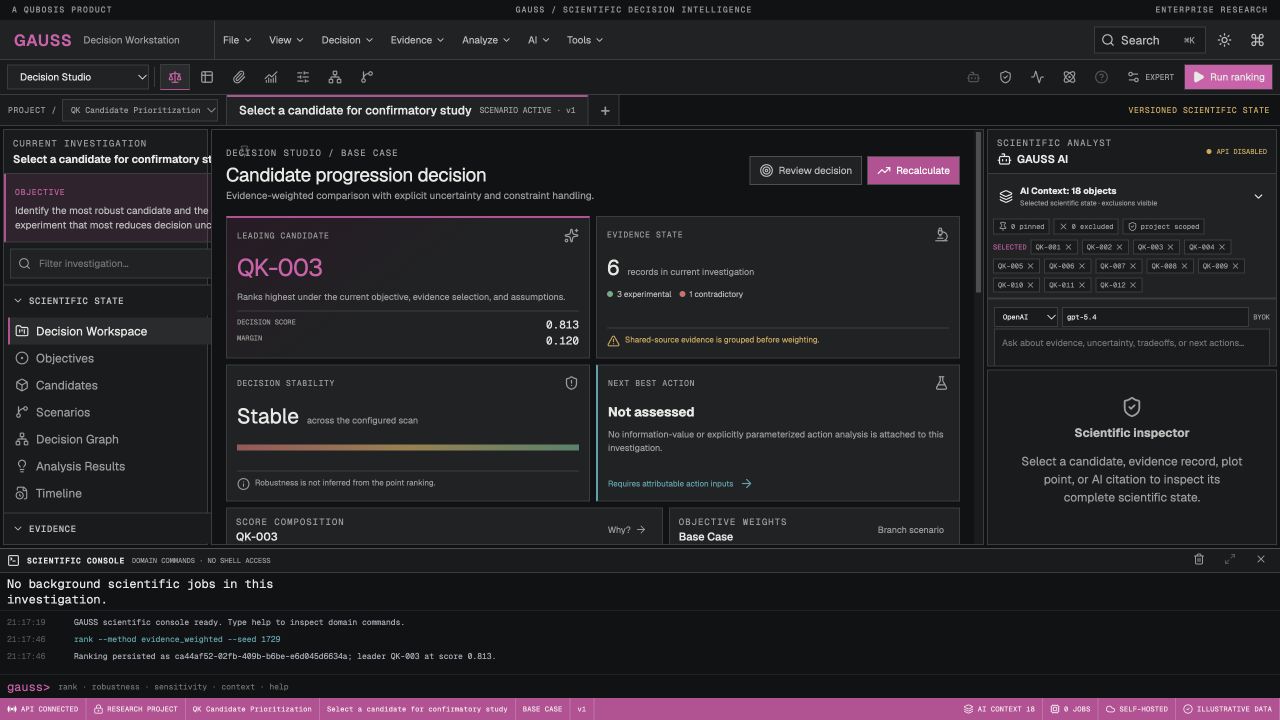
Decision Studio shows the leading candidate, score and margin when available, evidence state, stability analysis, next-best-action status, score composition, objective weights, and candidate matrix. Inspect the retained candidate set and filters before interpreting the ranking. An excluded or screened-out option should remain distinguishable from an option that was evaluated and ranked last.
Open score composition to see which objectives contributed and how their weights affected the result. Review conflict counts, shared-source evidence, units, and evidence status. The application can label a record illustrative; those records are useful for exploring the interface but must not be presented as validated evidence or as a real operational recommendation.
WORKING IN DEPTH
The Pareto view displays candidates that are not dominated across the configured objectives. A Pareto front is a set of trade-offs, not a recommendation to choose one point. Compare candidate positions and objective directions, and confirm that constraint handling matches the decision model before discussing a preferred option.
Sensitivity analysis varies objective weights or parameters and shows how the ranking changes. Inspect the configured ranges, sampled points, warnings, and any single-objective edge cases. A stable point ranking under one scan does not prove robustness to every unmodeled assumption. Use the result to ask which judgment or measurement matters most, then record the answer as a review note or a new scenario branch.
WORKING IN DEPTH
Robustness analyses can evaluate candidate behavior across uncertainty settings and run as version-pinned background jobs. Track their job progress in the bottom console and open result-specific detail panels when complete. Confidence, uncertainty, and stability depend on the recorded distributional or scenario assumptions; never interpret a numeric range without reading those assumptions.
Formal expected value of perfect information (EVPI) and expected value of sample information (EVSI) analyses estimate how additional information might affect a configured decision model. Their usefulness depends on well-specified outcomes, uncertainty, costs, and sampling assumptions. Inspect the exact input manifest, method version, and assumptions. If the action inputs are incomplete, the application can report “not assessed” rather than fabricate a next experiment.
Identify which evidence has uncertainty and whether the distribution or bounds are justified.
Record the input version and inspect progress, completion state, and result details.
Confirm action, sampling, outcome, and cost assumptions before interpreting EVPI or EVSI.
WORKING IN DEPTH
A scenario branch lets you explore changed objective weights, assumptions, evidence selections, or candidate subsets without modifying the base case. The scenario records its parent and context so a reviewer can identify the difference. Use the comparison view to review changed inputs and results before carrying a branch into a decision discussion.
Named context groups and version-pinned bookmarks can save an exact candidate, evidence, and filter selection. Rename or reapply a group when you want to return to a known analysis context. Archive controls should preserve history; changing a context group does not change the underlying scientific data or prove that the selected records are appropriate.
WORKING IN DEPTH
The decision graph displays persisted typed edges among scientific objects and is lazy-loaded so the main workspace remains responsive. The timeline and activity views help follow edits, scenario creation, analyses, reviews, and decisions. Inspect the object records behind a node or edge; graph presence indicates a recorded relation and not causation.
The scientific console accepts domain commands and does not provide shell access. The interface can call analysis, context, and project actions from menus, the command palette, or the console. Inspect a command's affected objects before accepting a mutation; numerical ranking remains the deterministic engine's responsibility, not an AI-generated substitute.
WORKING IN DEPTH
AI tools, when configured, receive a minimized context manifest built from selected project objects and attachments. Inspect which candidates, evidence, and source excerpts are visible to the analyst. Unselected records should not be assumed to be included. The AI can interpret context and invoke approved tools, but it cannot author numeric scores or fabricate provenance.
A consequential change remains pending until a human approves it. Check citations against their original source and treat AI assertions as interpretation rather than validated evidence. Attachments can be uploaded and anchored for review; confirm the file, page, and text location before relying on an excerpt. Sensitive context should be limited to the minimum authorized scope.
WORKING IN DEPTH
Keep ranking, recommendation, decision, override, and approval as distinct states. A reviewer can comment, challenge an input, or record an override with a reason. Independent review and approval should identify the exact analysis version and its context, not a mutable project label. The record retains human authority rather than automatically promoting the top-ranked row.
When evidence or weights change, generate a new analysis and review it against the prior result. Preserve both the original and changed states so a team can see what changed and why. Any operational policy—such as who may approve or which evidence state blocks an action—must be reviewed against the application's configured controls and organizational process.
Confirm method, model, evidence versions, and scenario before reviewing a result.
State what should change and explain the rationale, including relevant evidence.
Record the responsible human and approval state for that specific decision version.
WORKING IN DEPTH
Snapshots and exports retain method metadata, input versions, seed, units, and provenance needed to examine a decision later. Preserve the hash-linked audit events and scenario parentage when handing off. Use a report to explain the decision question, objectives, method, rejected candidates, uncertainty, conflicts, and human review—not just the top score.
The bundled GAUSS investigation is illustrative. Its values and outcomes demonstrate the workflow and should not be described as real scientific evidence. GAUSS is decision support rather than a molecule editor, simulation engine, or literature retrieval product; it does not provide clinical recommendations, validated safety claims, formal GxP controls, or 21 CFR Part 11 compliance.
WORKED EXAMPLE
The captured Decision Studio workspace uses the bundled illustrative QK Candidate Prioritization investigation. Its local ranking action placed QK-003 first with a displayed decision score of 0.813 and a margin of 0.120. The same workspace labels its records illustrative, reports six evidence records, and shows that a next-best action has not been assessed. These values demonstrate the UI and deterministic engine behavior for the seed; they are not real candidate measurements or a research recommendation.
A researcher exploring the tool can open the score composition, review objective weights, inspect the candidate matrix, and compare the evidence state with the stability panel. They can change an objective weight in a scenario branch, inspect Pareto membership or sensitivity, and review which source groups contribute. Before using a real decision state, they must replace the fixture with attributable measurements, define units and constraints, check source dependence, and have a human reviewer assess the exact method and result.
Confirm the investigation and all seeded candidate rows are marked illustrative.
Trace the displayed 0.813 score to the configured objectives and their recorded weights.
Change a documented assumption in a separate scenario and compare it with the base case.
Import sourced, unit-aware evidence and complete review before making a decision claim.
KEEP THIS CLOSE
Candidate measurements, units, preference direction, weights, feasibility constraints, evidence groups, and uncertainty assumptions.
Versioned rankings, Pareto and sensitivity analyses, robustness jobs, scenario comparisons, review records, and decision snapshots.
Inspect normalization, missing data, source dependence, conflicts, uncertainty and method metadata before accepting a ranking or proposed action.
TERMS IN CONTEXT
WHEN SOMETHING NEEDS ATTENTION
Inspect retained-set selection, constraints, missing values, units, and the analysis input version. Screened records differ from ranked records.
Read the sensitivity result and document the plausible range. The decision may be conditional on stakeholder preferences.
Review attributable action, outcome, uncertainty, sampling, and cost inputs. A point ranking alone does not determine the next experiment.
06 / SCOPE AND LIMITS
Gauss rankings depend on supplied evidence and assumptions. Outputs support scientific review; they are not clinical recommendations, validated safety claims, or a formal GxP / 21 CFR Part 11 system.
Confirm the current capability state in the application before starting work. A planned operation, a generated preview, or a queued job should not be described as a validated scientific result.
CONNECTED WORKFLOWS
SEE GAUSS IN CONTEXT
Request a walkthrough with the Qubosis team.


