 qubosis
Plan with purpose
Create and revise task graphs with explicit inputs, dependencies, parameters, and human review gates.
RESEARCH & EVIDENCE / RESEARCH ORCHESTRATION

Give your research a direction.
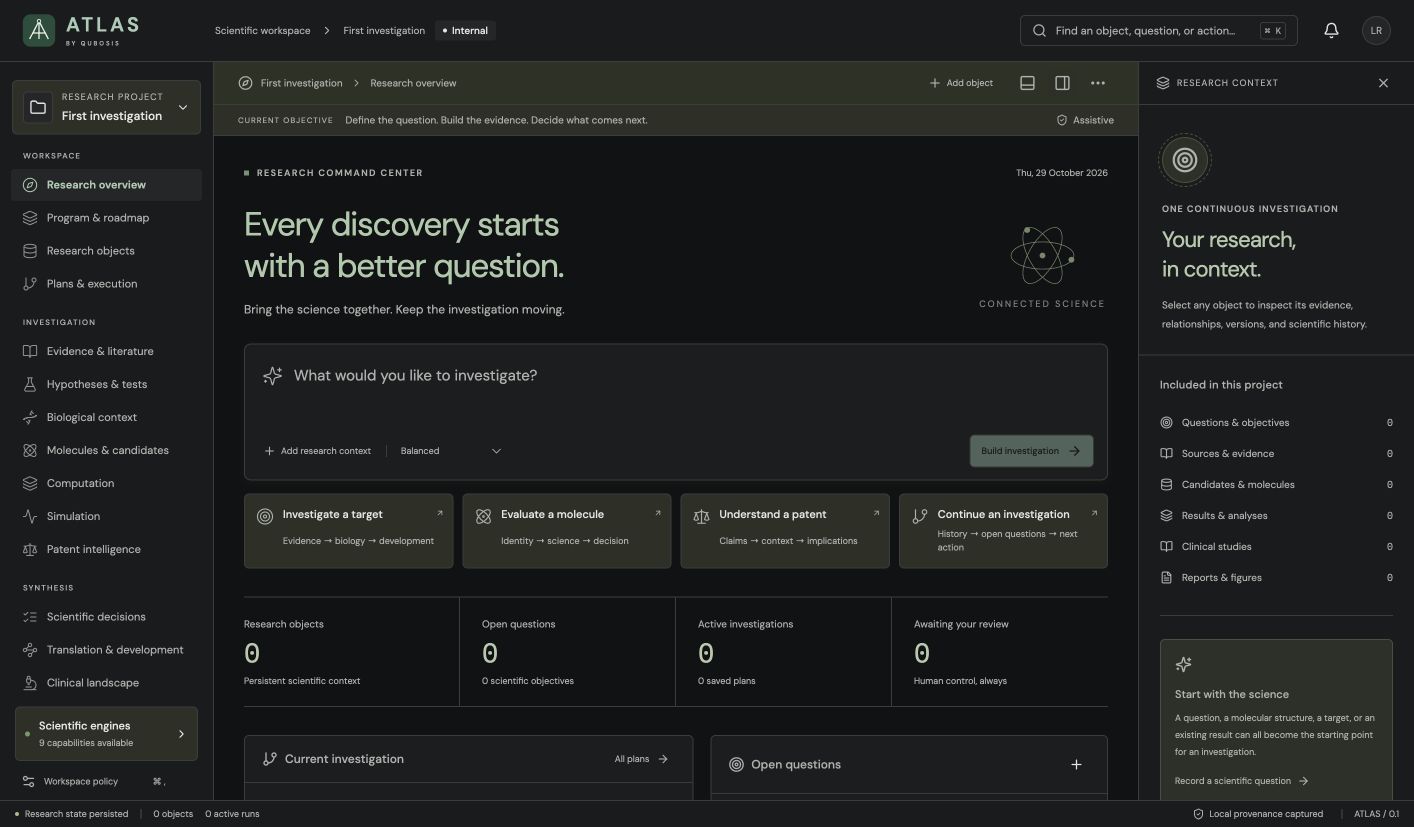
Turn a scientific question into a reviewable plan. ATLAS brings research objects, computational tasks, evidence, figures, and reports into one organized workspace, with the exact source versions and decisions kept in view.
01 / OVERVIEW
Turn a scientific question into a reviewable plan. ATLAS brings research objects, computational tasks, evidence, figures, and reports into one organized workspace, with the exact source versions and decisions kept in view.
The sections below describe the product capabilities, use cases, system requirements, and documented workflow in the source application.
02 / FEATURES
This inventory explains what each capability does, which records and decisions it touches, and where its scientific or operational boundary applies. External services and unavailable engines are identified as such.
Create and revise task graphs with explicit inputs, dependencies, parameters, and human review gates.
Preserve source versions, hypotheses, decisions, and the reasoning behind each step of an investigation.
Assemble source-linked reports and figures, then export Markdown, HTML, Word, LaTeX, or a research package.
Give a question, source, molecule, target, observation, result, figure, or report a persistent identity. Preserve the source reference and object version used by later work, inspect relationships in the object inspector, and see when a changed or rejected upstream object makes dependent work stale.
Turn recorded intent into an editable task graph. Review task types, explicit inputs, parameters, conditions, dependencies, waits, and bounded iterations. ATLAS uses deterministic routing rules; a suggested plan is a work proposal that a researcher edits and approves, not a scientific finding.
Release a frozen plan revision, compare it with earlier revisions, and branch from a chosen point when the approach changes. The released version keeps its own history while a new branch explores alternatives, so edits do not silently rewrite the plan that produced an earlier run.
Inspect ownership, source versions, missing configuration, proposed external calls, computational needs, and workspace policy before dispatch. External and computational execution begin disabled. Human review gates can require a recorded rationale; the stricter project or workflow limit governs execution.
Execute, step, pause, or cancel a workflow while keeping run state on the server. Each iteration records its input versions, parameters, outputs, and stop reason. Parameter sweeps use an explicit set of values per iteration, and run comparisons show plan, policy, task, and recorded outcome differences.
Resume eligible work deliberately after interruptions. Retries are limited to eligible read-only failures, launch request IDs guard against duplicate dispatch, and compatible-result reuse is opt-in and checks input hashes, review state, output versions, and the local engine identity. A remote job cancellation is not inferred from stopping local monitoring.
Keep a scientific statement connected to supporting and contradicting evidence, uncertainty, a proposed test, and a rationale for its assessment. Clinical landscape views preserve registry population, eligibility, endpoints, recruitment, dates, and result availability, and can pin comparisons of up to four studies.
Import supported CSV, TSV, or JSON observations with explicit units, then use the existing Turing renderer to explore and save figure versions. Reports pin figure and table versions; publication packages can include SVG and PNG figures, complete CSV tables, source objects, exported documents, and checksums.
Generate deterministic follow-up proposals from open questions, contested hypotheses, recorded results, or communication needs. Review the cited inputs, accept, defer, or reject with a rationale, and inspect the resulting plan before any run. Journal entries, snapshots, package history, integrity checks, and a durable Nightingale outbox support continuity.
03 / SYSTEM REQUIREMENTS
Node.js 22.13 or newer and npm. ATLAS stores its local workspace in SQLite; scientific engines run as separately configured services.
From the ATLAS project directory, run `npm ci`, then `npm run dev`. Open the loopback address shown by the application. For a production build use `npm run build` followed by `npm start`. Start and authorize each connected scientific engine separately.
04 / USE CASES
These examples show how the product’s implemented tools can be combined. They describe workflows, not guaranteed scientific outcomes.
Turn a multi-stage research question into a plan that collaborators can inspect before execution.
Coordinate selected Qubosis scientific capabilities while keeping engine availability and authorization visible.
Maintain versioned research objects as a project moves from evidence gathering to analysis.
Prepare a report whose claims, figures, and source context can be reviewed together.
Compare successive analysis plans and branch an alternative without replacing the revision used by a completed run.
Keep a multi-product project blocked until each required service, source version, and human review gate is ready.
Compare registry studies while distinguishing protocol endpoints from outcomes that have actually been reported.
Publish a source-pinned report package whose figures, tables, object versions, and checksums can be inspected together.
05 / DOCUMENTATION
A detailed operating manual from first setup through advanced analysis, review, collaboration, and export. Each section explains the records to prepare, the steps to take, how to read the result, and what remains outside the implemented product.
A guide to the sequence of work in ATLAS. Steps can require review or configured services before continuing.
FIND YOUR NEXT STEP
15 of 15 chapters
FOUNDATIONS
ATLAS is the coordination space for an investigation. A project begins with a question and a set of research objects, then gains tasks, dependencies, evidence, computation receipts, figures, and reports as the work advances. Its planner routes work through registered capabilities; it does not turn an outline into a scientific result by itself.
The core habit is to make a plan legible before execution. Each task should state what it needs, what it may produce, and which upstream objects or decisions it depends on. That makes it easier for a colleague to notice a missing unit, a stale source, or a service that is not configured before time is spent on a run.
FOUNDATIONS
Create a project for one coherent research program. Record the question, intended scope, target or subject, and any assumptions that affect the work. Use research objects for the scientific entities, source records, datasets, or results that need stable identity and version history. Inspect an object's sources and relationships before using it as an input to a later task.
Keep the initial record specific enough that a collaborator can tell what evidence would answer the question. If the scope changes, capture that change as a decision or a new object revision instead of silently replacing the original intent. The first workspace is empty by design; ATLAS does not seed invented findings into a new investigation.
FOUNDATIONS
Open Plans & execution and add the work in the order it needs to happen. Define task type, inputs, parameters, conditions, dependencies, and bounded iterations. A task graph is useful when a later analysis depends on a particular evidence review or computation; encode that relationship rather than relying on a note in a separate document.
Before a task can be run, review the proposed dry run. Confirm the source versions, requested external calls, execution permissions, and available engine. ATLAS starts execution disabled. An unavailable or unauthorized engine should remain visible as a blocker with its output absent; do not treat a planned task or a submission receipt as a completed scientific result.
Write down the action and the object it will operate on. Separate the input data from parameters and expected outputs.
Confirm that upstream tasks and pinned source versions are the ones the current plan intends to use.
Review proposed computations and external requests. Resolve missing connections and permissions before enabling execution.
Record a frozen plan revision when the reviewed plan is ready to share or execute.
FOUNDATIONS
ATLAS coordinates product capabilities; it does not replace them. Vann can provide literature context, Mendel can provide biological connector requests, Kekulé can validate structures, Planck can submit an existing electronic-structure problem, Ising can run a configured particle model, Gauss can compare supplied measurements, and Turing can render datasets. Each connector must be configured and authorized in its own service. ATLAS exposes health and configuration errors so a URL alone does not count as a healthy connection.
When results return, attach their receipts and provenance to the relevant objects. Record what was reviewed, who made the decision, and which exact versions were considered. Treat planned outputs, absent engine outputs, and failed requests as different states; that distinction is essential when a project is revisited later.
FOUNDATIONS
Use the reporting workspace after the evidence and results are assembled. Select the research objects, source-linked findings, figures, and methods that belong in the narrative. Review the generated content as a draft: inspect source links, verify the language around uncertainty, and remove any text that makes a stronger claim than its inputs support.
ATLAS can export Markdown, HTML, Word, and LaTeX reports as well as JSON research packages. A report export is a communication artifact, not an independent validation of the investigation. For a handoff, include the relevant frozen plan and preserve source and result identifiers so the next team can see what the report was built from.
FOUNDATIONS
Local research is stored in `data/atlas.sqlite`. Keep the database together with its write-ahead log files while the application is running. Use SQLite backup facilities for a live backup, or stop the application before copying the database files. Research packages offer another way to preserve project content for a controlled handoff.
External service credentials belong in deployment configuration, not in research objects. When a task is blocked, inspect workspace policy and engine health instead of editing the scientific record to conceal the block. Revisit the plan whenever a source version or assumption changes, because downstream tasks may need another review.
WORKING IN DEPTH
A project is the working boundary for a coherent research question. Within it, objects carry their own identity, source reference, version, classification, and relationships. This lets a task name the exact molecule, source, dataset, or result it consumes instead of depending on a mutable label such as “latest.” Use the object inspector to check these details before adding an object to a plan.
When an object is revised, the earlier version remains part of the record. A reviewer can compare the versions, identify what changed, and see which downstream tasks refer to the prior state. Rejected, superseded, or changed source records can mark dependent work stale. That warning means the recorded basis has changed; it does not automatically establish that the result is wrong or that a new run will be equivalent.
Record the scope, target, system, assumptions, and decision that the project is meant to inform.
Add or import the source objects and inspect their stable IDs, versions, units, and provenance.
Confirm that links between objects describe the intended dependency rather than a loose association.
WORKING IN DEPTH
The planner represents work as a directed graph. A task should state its operation, inputs, parameters, prerequisites, conditional results, and outputs. If a report depends on a reviewed figure, or a calculation depends on a validated molecular version, encode that dependency. An explanatory note is useful, but it cannot substitute for an explicit edge when execution order matters.
Review every proposed step for method fit and data readiness. Check bounded iterations and stop conditions before releasing a plan. Structured results determine conditions; absent or malformed values cannot be treated as convergence. Use plan history to compare revisions and branch from the revision that matches the question. Releasing a plan freezes that revision for later run comparison.
Use exact object references and record units, method settings, and expected output types.
Connect prerequisites explicitly; make conditional branches depend on recorded structured results.
Review the dry run and policy summary, then release the revision when its scope is ready.
WORKING IN DEPTH
The run screen exposes task states, attempts, iterations, events, and engine summaries. A workflow policy and the current workspace policy both apply; the more restrictive autonomy or resource limit wins. Dispatch budgets and parallelism are checked before execution. A delayed task can retain a deadline without using active runtime while it waits, and a browser refresh does not stop server-side execution.
After a restart, active work is paused for deliberate continuation. Inspect which steps may have caused external effects before retrying. The application keeps local monitoring state distinct from a remote provider's state: cancelling a local monitor does not prove the remote job was cancelled. Reuse is conservative and optional; it requires compatible inputs, recorded output versions, hashes, review states, and engine identity rather than matching a task name alone.
Resolve missing services, permissions, stale sources, and resource limits before enabling execution.
Follow task status and inspect attempts and iteration stop reasons rather than relying on a single completion badge.
Inspect interrupted external work and use retry or reuse only when the recorded eligibility rules pass.
WORKING IN DEPTH
Hypotheses & tests stores a versioned argument: a statement, its uncertainty, the evidence that supports it, evidence that challenges it, proposed tests, and an assessment rationale. Keep observation and interpretation distinct. A change in evidence or context can make an earlier assessment incomplete; preserve the former assessment and create a new one instead of editing the history into apparent certainty.
Use this area to prepare a research meeting or to translate an unresolved mechanism into a discriminating experiment. ATLAS does not calculate an automatic probability that a hypothesis is true. It can keep competing explanations visible and link the next test to the question it addresses. Use a rationale that explains why a result would support, weaken, or leave the hypothesis unresolved.
Make one claim specific enough to identify what observation could challenge it.
Link supporting and contradicting records with their versions and context.
Record what each plausible outcome would mean and what uncertainty would remain.
WORKING IN DEPTH
Clinical landscape queries ClinicalTrials.gov study records and preserves the registry fields that matter to interpretation: population, eligibility, intervention, endpoint timeframes, recruitment status, dates, and reported-result availability. Compare up to four studies in a saved, source-pinned report. Keep the difference between an endpoint described in a protocol and a result actually reported in the registry visible.
A registry comparison organizes records; it does not pool clinical outcomes, establish efficacy, or certify a treatment. Check the retrieval date, registry identifier, inclusion rationale, and missing fields. If the evidence question requires full publications or validated clinical synthesis, gather and review those sources through the appropriate process instead of inferring an answer from registry metadata alone.
Write down the intervention, comparison, outcome, and study characteristics relevant to the review.
Check eligibility, recruitment, endpoint timeframe, dates, and whether results are reported.
Save the included study versions and explain why each one belongs in the comparison.
WORKING IN DEPTH
The figures and visualizations workspace accepts supported observation files and keeps units with imported fields. Confirm the import preview before accepting data. ATLAS hands figure work to the existing Turing renderer; it does not contain an independent general-purpose plot engine. Save changed figure settings as a new version so a later reviewer can tell which view the report used.
Reports combine selected objects, source-linked findings, methods, figures, and tables. Narrative drafts persist separately from committed report revisions. Review source status and report checks before release; stale, rejected, missing, or unreviewed inputs can block a report from being marked ready. Exports include Markdown, HTML, Word, LaTeX, structured JSON, or a publication ZIP. The HTML print view can be used to create PDF.
Review schema, units, source identity, and observation coverage before plotting.
Save the exact input and figure versions used to make the visualization.
Check citations, status warnings, methods, and embedded assets before export.
WORKING IN DEPTH
Next research actions are generated from recorded state by explicit deterministic rules. The system can propose evidence gathering for an open question, reassessment for a contested hypothesis, result review, or research communication. Each proposal carries its source references and rule rationale so a collaborator can inspect why it appeared.
Accepting a proposal creates an inspectable plan; it does not launch a run. Defer or reject with a rationale when the action is premature or irrelevant. Changed source versions or review states can invalidate acceptance and require a new proposal. Treat these suggestions as a structured reminder of recorded gaps, not autonomous experimental design or unrestricted scientific reasoning.
WORKING IN DEPTH
A snapshot freezes a project state for comparison or handoff. Research packages include immutable object and workflow history, runs, and recorded events. Import remaps identities, resets execution permission, and retains prior execution records as an archive; an imported job is never automatically resumed. This makes import a controlled transfer of research context, not a way to bypass a new project's policy checks.
Local SQLite persistence includes write-ahead log files. Use SQLite backup facilities for a live backup or stop ATLAS before copying database files. Integrity verification, the research journal, and Nightingale's capture outbox answer different questions: local integrity checks do not prove a remote delivery succeeded, and a delivered provenance object does not replace the complete local execution history. Keep both states explicit during recovery.
WORKED EXAMPLE
Suppose a team wants to compare two candidate interventions and prepare a report for its next research meeting. In ATLAS, the team creates a project that states the comparison, the intended audience, and the decision it will inform. It registers the evidence sources and any existing molecular or target records as versioned objects, then drafts a plan with separate tasks for evidence review, a configured computation, figure preparation, and report assembly. This example describes a workflow shape, not a recommendation about a real intervention.
Before execution, the team inspects the task dependencies, source versions, units, engine health, and workspace policy. A dry run exposes a missing connection or a disabled external call before it can be mistaken for an output. After a permitted run, researchers review each returned object, update a hypothesis with support or counterevidence, and save a figure version. The report uses the pinned versions and can be blocked if a source is stale or unreviewed. A released plan, run receipt, or report export does not itself validate the underlying scientific method.
Record the question, candidate identities, assumptions, source objects, and who will review the result.
Connect evidence review and computation to the exact inputs and figure/report tasks that depend on them.
Resolve engine, authorization, stale-source, budget, and human-review gates before dispatch.
Assess returned objects, pin the figure and sources, commit the report revision, and export the selected format.
KEEP THIS CLOSE
Versioned research objects, scientific questions, sources, explicit task parameters, dependencies, and configured engine capabilities.
Frozen plans, run and iteration records, reviewed objects, figures, reports, snapshots, and publication packages.
Check the dry run, exact input versions, engine availability, execution policy, human gates, and source status before releasing a report.
TERMS IN CONTEXT
WHEN SOMETHING NEEDS ATTENTION
Inspect Dry run and Workspace policy. Verify the engine is running and authorized, input versions are usable, and the requested external or computational action is permitted.
Inspect recorded events and remote receipts first. Work that may have caused an external effect needs deliberate review before another launch.
Open its source checks and resolve missing, stale, rejected, or unreviewed references. Commit a new report revision after review.
06 / SCOPE AND LIMITS
ATLAS orchestrates explicit, registered scientific capabilities. It does not itself validate a method, create missing scientific outputs, or authorize external services. Every engine must be started and authorized separately.
Confirm the current capability state in the application before starting work. A planned operation, a generated preview, or a queued job should not be described as a validated scientific result.
SEE ATLAS IN CONTEXT
Request a walkthrough with the Qubosis team.


