 qubosis
Work with real chemistry
Parse, sanitize, and canonicalize SMILES, generate 2D coordinates, and inspect baseline descriptors with RDKit.
MOLECULES & SIMULATION / MOLECULAR ENGINEERING

Build molecules. Preserve every decision.
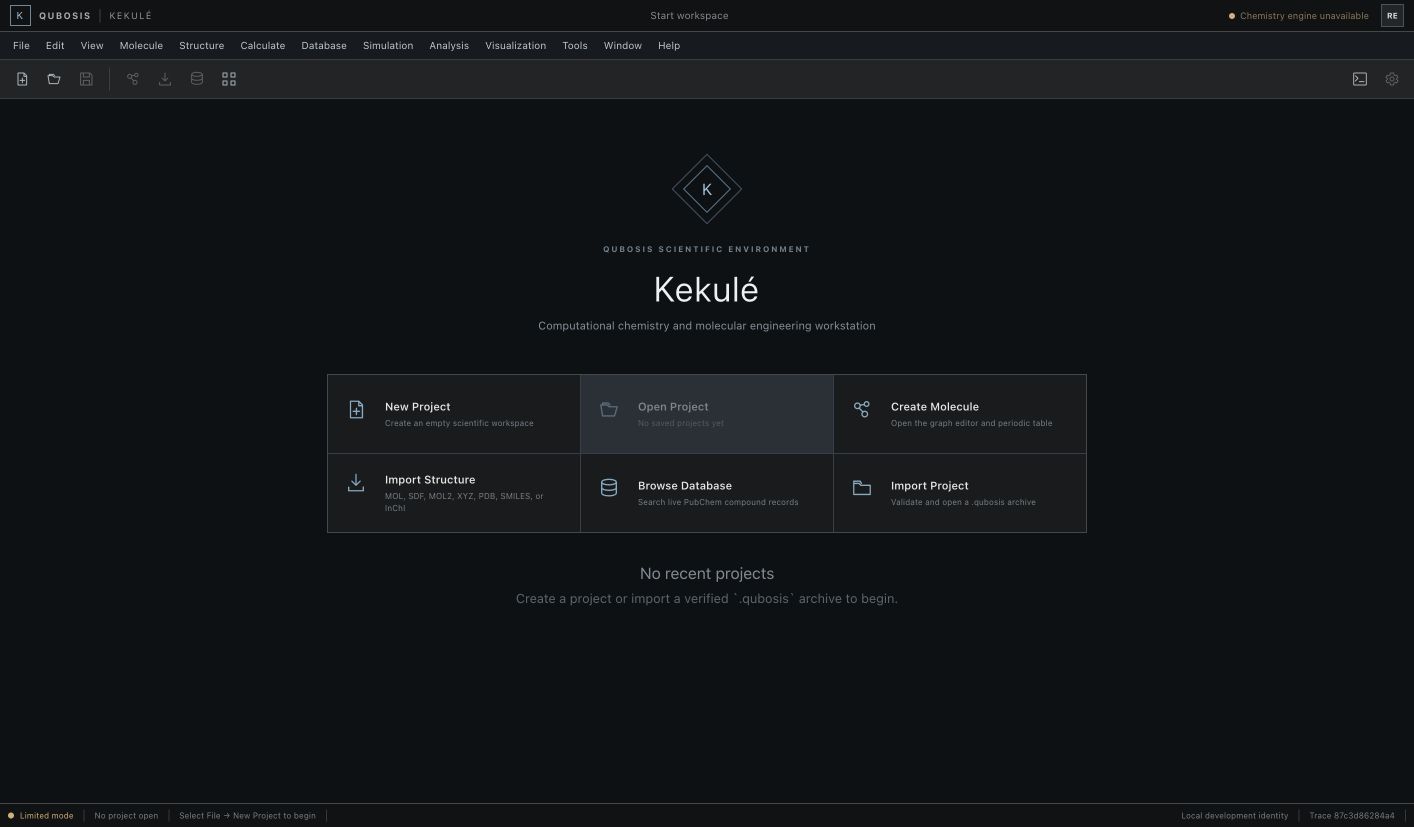
A molecular engineering workspace built around real chemical structures. Kekulé combines RDKit chemistry, synchronized molecular views, and versioned scientific objects so a design change remains connected to its identity and history.
01 / OVERVIEW
A molecular engineering workspace built around real chemical structures. Kekulé combines RDKit chemistry, synchronized molecular views, and versioned scientific objects so a design change remains connected to its identity and history.
The sections below describe the product capabilities, use cases, system requirements, and documented workflow in the source application.
02 / FEATURES
This inventory explains what each capability does, which records and decisions it touches, and where its scientific or operational boundary applies. External services and unavailable engines are identified as such.
Parse, sanitize, and canonicalize SMILES, generate 2D coordinates, and inspect baseline descriptors with RDKit.
Explore synchronized 2D and 3D atom selection while keeping molecular identity and context together.
Record immutable revisions, branches, and decisions; prepare versioned computation requests with explicit provenance.
Parse, sanitize, and canonicalize supported SMILES and validate supplied molecular identity through the chemistry service. The application reports parse or sanitization problems rather than rendering a malformed string as if it were a trustworthy structure.
Calculate the descriptors currently supported by the local RDKit-backed foundation and retain their relationship to the structure revision. Descriptors are computational summaries of a representation, not an experimental property measurement or a guarantee of downstream behavior.
Inspect generated 2D coordinates and an interactive molecular view with synchronized atom selection. Use selection to identify the same atom across views while keeping the source structure and its revision in the project context.
Keep each scientific structure change as an immutable revision with a content identity. Review prior state and the reason for a change rather than silently overwriting the record used by a downstream calculation request.
Preserve alternative structure directions in separate branches and record a decision explaining why one version was chosen. The project history connects edits and commands to provenance and audit events.
Prepare a versioned request and evidence contract for a compatible Planck workflow. This records the intended handoff boundary; the presence of a request is not evidence that Planck was connected or that a scientific computation ran.
Inspect which integrations or scientific engines are enabled in the current installation. Absent RDKit, Planck, OpenMM, or other capabilities are shown as unavailable with a factual reason rather than replaced by a simulated result.
Export and import a `.qubosis` ZIP package with checksums and archive validation. Inspect the package contents and integrity results before using it for a handoff; checksums help detect changes but do not validate scientific meaning.
Organize molecular records under tenant-scoped projects and persist commands idempotently through the local data service. A project history can be reviewed independently from any remote compute engine or future desktop shell.
03 / SYSTEM REQUIREMENTS
Node.js 22.13 or newer and npm for the web workstation. The scientific API and chemistry worker have their own Python/RDKit environment.
Run `npm install` from the Kekulé project and start the web and science services with `npm run dev`. Check the capability registry for RDKit and any calculation engine before relying on a control; absent capabilities are disabled with a reason.
04 / USE CASES
These examples show how the product’s implemented tools can be combined. They describe workflows, not guaranteed scientific outcomes.
Create and compare versioned molecular structures during a design study.
Validate molecular identity and baseline descriptors before preparing a calculation request.
Branch a structure revision to preserve alternatives and record why a design changed.
Package molecular projects and provenance for handoff to a computational chemistry workflow.
Check whether a structure representation parses and sanitizes before the team requests a downstream calculation.
Compare two molecular revisions while preserving the original atom identity, content hash, and decision rationale.
Use synchronized 2D and 3D inspection to discuss which atom or substructure a planned edit refers to.
Prepare a versioned Planck request contract and hand off an integrity-checked project package without claiming that a calculation has completed.
05 / DOCUMENTATION
A detailed operating manual from first setup through advanced analysis, review, collaboration, and export. Each section explains the records to prepare, the steps to take, how to read the result, and what remains outside the implemented product.
A guide to the sequence of work in Kekulé. Steps can require review or configured services before continuing.
FIND YOUR NEXT STEP
15 of 15 chapters
FOUNDATIONS
Kekulé is a persistent molecular engineering workstation, not a decorative molecule viewer. Create a project before importing or editing a structure so each object has a research context, owner, and version history. The local demo data is illustrative; it does not mean a scientific calculation has run.
Choose one molecular problem per project or keep related structures in a named series. Record source, intended comparison, and any assumptions about protonation, stereochemistry, charge, or geometry before interpreting descriptor values. Those details can affect what looks like a small structural change.
FOUNDATIONS
Enter SMILES or import a supported molecular structure. When RDKit is available, Kekulé parses the input, sanitizes it, canonicalizes identity, generates 2D coordinates, and reports baseline descriptors. Inspect warnings instead of dismissing them. A successful parse confirms the software accepted the input; it does not validate whether the structure matches the intended experiment.
Use synchronized atom selection to understand correspondences between 2D and 3D views. Check aromaticity, formal charges, stereochemistry, coordinate orientation, and any omitted atoms or bonds. If the same entity is imported from another source, compare identity and provenance before deciding whether it is a duplicate or a distinct version.
Record the question and link the source or design context before creating the first object.
Enter SMILES or import a supported structure format; keep the original source identifier.
Check RDKit status, canonical identity, sanitization warnings, descriptors, and generated coordinates.
Record a reason for change and create an immutable object version before branching a design.
FOUNDATIONS
Make each meaningful design change as a new revision. Explain why the change was made, what source or constraint prompted it, and which properties you want to examine next. Branching allows an alternative to remain visible without overwriting the prior structure. Compare revisions as scientific objects, not only as images.
The viewport and object inspector provide useful visual checks, but a rendered bond diagram is not a complete record. Keep atom identity, bond order, charge, stereochemical context, and source files with the object. Revisit the exact input file if the visualization and your intended chemistry disagree.
FOUNDATIONS
Open Calculations only after the molecule revision is stable enough for the intended compute task. Choose an engine from the capability registry, select the input version, and review every calculation parameter before submission. The product uses versioned contracts to connect with Planck and other supported engines; an unavailable engine is not silently substituted.
Check that the request has an explicit atom count, method, charge, spin or other applicable settings, and resource expectations. A queued request is not a computed result. Keep a job receipt and returned artifacts attached to the molecular version so later comparisons can identify which exact geometry was used.
FOUNDATIONS
When a supported engine returns results, inspect the status, provenance, and warnings alongside the values. Compare like-for-like methods and structures; note whether geometry optimization or other preprocessing altered the input. Do not infer reaction success, biological activity, or an experimentally validated property from baseline descriptors alone.
Export a `.qubosis` project archive to preserve the structure, history, decisions, and checksums for handoff. Review the archive manifest and validation outcome before sharing. A project package helps move the record; it does not replace independent verification of chemistry or calculation output.
FOUNDATIONS
Kekulé distinguishes implemented capabilities from planned or unavailable ones. RDKit-backed structure validation is present in the shipped chemistry service, while compute engines only execute when an adapter is actually available and configured. Use the visible registry to confirm what the current workstation can do rather than relying on a product roadmap or a disabled menu item.
The local workspace includes illustrative molecular examples. Do not cite their data as a calculation. If a structure file or chemistry dependency is missing, resolve the source or service setup first and preserve the unavailable state in the project record.
WORKING IN DEPTH
Create or open a project before changing a structure. The project holds scientific identity, revision history, source context, decisions, and any intended integration handoffs. Confirm the molecule's stable identifier and current revision before using it in a discussion or downstream request. Tenant-scoped persistence is part of the local service boundary.
The bundled workstation contains illustrative molecular records. Treat them as UI examples only. Start a clean project for real research and import a structure from a supported representation. A visual depiction is not proof of chemical validity; use the chemistry validation response and retain its source revision and status alongside your notes.
WORKING IN DEPTH
SMILES parsing passes through the local RDKit-backed chemistry service for sanitization and canonical identity. Review errors or warnings and compare the canonicalized form with the representation you intended to import. The implemented slice emphasizes structure identity and validation; do not infer unsupported file conversion or computation features from the presence of a molecule viewer.
The current foundation reports baseline descriptors and generates 2D coordinates. Check which descriptor values are actually returned and how the application labels their method. A descriptor should remain associated with the exact input revision, because even a small structural change can make a prior value stale. Experimental properties and biological activity are outside a deterministic depiction or descriptor calculation.
Paste or import a supported molecular representation and retain the original source string.
Inspect parser messages, sanitization status, canonical identity, and supported descriptor output.
Record a revision when the normalized molecular object is accepted into the project.
WORKING IN DEPTH
Use the 2D depiction to inspect connectivity and the 3D view to discuss spatial arrangement when coordinates are available. Selecting an atom in one view synchronizes selection in the other, helping a team discuss a specific atom rather than relying on an ambiguous screen coordinate. Keep the molecule name and revision visible when taking notes.
Generated coordinates are a visualization aid. They should not be mistaken for a validated conformer ensemble, a minimized geometry, or an experimentally resolved structure unless the source and method explicitly say so. Use the source panel to distinguish coordinates that came from an input file from coordinates generated for display.
WORKING IN DEPTH
Molecular design work often has competing structures. Keep alternative edits in separate revisions or branches instead of replacing the project record in place. Record the change reason, source, decision, and any comparison criteria that shaped the choice. Content hashes help identify an exact object state and support integrity checks on later exchange.
Immutable revisions let downstream records continue pointing at the version they actually used. If a later review selects another branch, create a new decision or request rather than relabeling an older calculation. A branch preserves provenance but does not automatically propagate changes into another Qubosis product.
WORKING IN DEPTH
The workstation uses an explicit command and integration contract. Commands can be idempotent, which prevents a repeated request from creating a second logical edit when the same request identifier is retried. Inspect the activity and audit record after an operation so you can verify which revision changed and whether the response came from the intended project.
The capability registry is the authority for an integration's current availability. If Planck, OpenMM, or another engine is absent, the UI should expose an unavailable state and its reason. Do not substitute a display-only status with a claim that a molecular calculation, energy evaluation, or simulation completed. The current repository is a local chemistry control-plane foundation, not a full compute environment.
WORKING IN DEPTH
Kekulé defines versioned request and evidence contracts for the Planck boundary. Before creating a handoff, pin the molecular revision and identify the requested calculation context, then inspect what evidence the receiving service requires. This contract makes the intended data exchange explicit and can support future integration.
A request object records intent; it does not itself submit a job or produce a result. Confirm the receiving Planck service and its capability state separately. When a result eventually returns through a supported integration, preserve its original job and result identifiers rather than attributing them to a local validation step.
WORKING IN DEPTH
Portable `.qubosis` project packages use ZIP structure, checksums, and safe archive validation. Export after confirming that the package includes the revisions, decisions, and records needed by the receiving team. Review the checksum manifest after transfer to detect altered files and retain the package version used in the handoff.
A checksum can establish that file bytes match the captured digest; it cannot establish that the structure is correct, that an external party is authorized to see it, or that a scientific conclusion follows from it. Check project classification and recipient permissions before sharing sensitive structures. Back up the local database and stored artifacts using the deployment's documented procedure.
WORKING IN DEPTH
The current implementation provides a working browser control-plane and chemistry-service slice: real structure parsing and sanitization when RDKit is configured, canonical identity, baseline descriptors, project persistence, immutable revisions, branches, decisions, provenance, and portable package validation. These capabilities form a solid molecular record and handoff layer.
The illustrative data does not establish that a molecule has been calculated. The presence of a Planck contract does not imply a live Planck connection, and the repository does not claim that OpenMM, reaction prediction, force-field simulation, or quantum computation ran. Consult the capability registry for the active installation and interpret every result according to its recorded source and status.
WORKED EXAMPLE
A chemist receives a molecular representation and wants to discuss a proposed substitution with a colleague. They open a project, validate the input through the RDKit-backed parser, review canonical identity and supported descriptors, and inspect the 2D/3D views with atom selection synchronized. Before making a change, they record the source and revision so later reviewers can distinguish the received structure from a generated depiction or a local edit.
The chemist creates a new branch for the proposed edit and leaves the original revision intact. They record the reason for the branch, inspect parser feedback, and compare the two revision identities. If the team plans a Planck calculation, it prepares a versioned request against the chosen structure and checks whether the receiving capability is actually enabled. The request contract is a handoff description, not proof that a calculation, optimization, or experimental test has occurred.
Check parsing, sanitization, normalized identity, and the supported descriptor output.
Branch from the original and keep each proposed change as a distinct revision.
Compare structure views and record which revision the team selected and why.
Create a version-pinned request only when the destination capability is available and authorized.
KEEP THIS CLOSE
Supported molecular representations, source identity, project context, and explicit structure-edit or handoff intent.
Validated canonical structures, baseline descriptors, 2D depictions, immutable revisions, decisions, and integrity-checked project packages.
Inspect parsing, sanitization, structure revision, coordinate origin, capability availability, and the receiving service before a compute handoff.
TERMS IN CONTEXT
WHEN SOMETHING NEEDS ATTENTION
Review parser or sanitization messages and compare the original representation with the intended molecule before changing it.
Read the capability registry reason and configure the appropriate service. A display record is not a completed calculation.
Check archive structure and checksum integrity. Preserve the failed file and compare it with an authorized fresh export.
06 / SCOPE AND LIMITS
Kekulé's current local foundation supports real RDKit-backed structure handling, while compute execution depends on the capability registry. The illustrative demo does not claim that a calculation ran.
Confirm the current capability state in the application before starting work. A planned operation, a generated preview, or a queued job should not be described as a validated scientific result.
SEE KEKULÉ IN CONTEXT
Request a walkthrough with the Qubosis team.


