 qubosis
Search your source collection
Use Boolean queries, field restrictions, jurisdiction filters, and family deduplication across imported patents.
RESEARCH & EVIDENCE / PATENT INTELLIGENCE

Make the patent landscape legible.
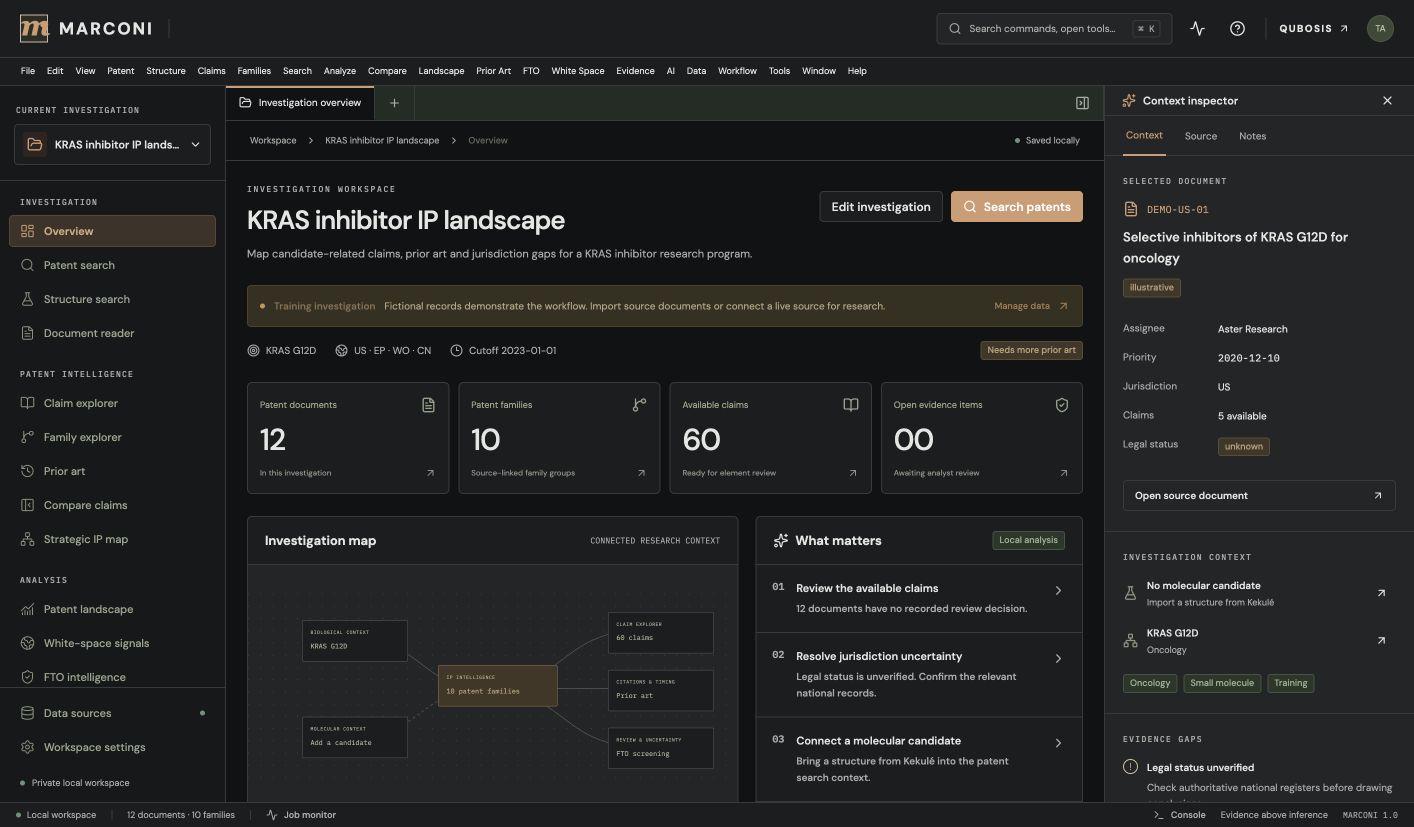
Bring inventions, patent documents, claims, and molecular structures into one investigation. Marconi keeps patent analysis connected to its source records and human review so a research landscape is easier to inspect and discuss.
01 / OVERVIEW
Bring inventions, patent documents, claims, and molecular structures into one investigation. Marconi keeps patent analysis connected to its source records and human review so a research landscape is easier to inspect and discuss.
The sections below describe the product capabilities, use cases, system requirements, and documented workflow in the source application.
02 / FEATURES
This inventory explains what each capability does, which records and decisions it touches, and where its scientific or operational boundary applies. External services and unavailable engines are identified as such.
Use Boolean queries, field restrictions, jurisdiction filters, and family deduplication across imported patents.
Review claim dependencies and explicit definitions. Use RDKit for structure validation, substructure, and similarity searches.
Build claim charts, record evidence gaps, and export source-grounded research briefs and investigation packages.
Record an invention, target, intended activity, jurisdictions, and search cut-off dates in workspace settings. Keep the population of sources and the method used to select them visible when reviewing a landscape or potential white space.
Import source metadata by CSV, investigation packages by JSON, or private patent text and PDF. Retrieve supported public records by identifier through PubChem or configure EPO OPS for CQL search, family, and claim retrieval with authorized credentials.
Use nested AND, OR, and NOT expressions, phrase and field restrictions, date and jurisdiction filters, and family deduplication. Results use explanatory lexical ranking; semantic mode is explicitly a lexical approximation, not a bundled embedding search.
Read imported source material in context and inspect claim dependencies, explicit definitions, Markush language, and numerical ranges. Rule-based segmentation helps organize claims, but every candidate mapping and interpretation needs human review.
Validate SMILES or MOL locally, render molecular depictions, and run exact, SMARTS substructure, supplied scaffold, or fingerprint-similarity searches over loaded structures. Inspect canonical identity and descriptor coordinates rather than treating similarity as legal evidence.
Explore patent families, citations, assignees, jurisdictions, and time-based records. Save a landscape observation with its source universe and method so another reviewer can reproduce the search context.
Map claim elements to invention records and attach supporting evidence, missing information, and human review decisions. The workbench organizes questions that need counsel or researcher review; it does not issue a legal opinion or inferred freedom-to-operate status.
Track source retrieval as explicit success, partial, failed, or cancelled work. Records are added only after acceptance, and concurrent edits stop on a conflict while offering a local backup and recovery path.
Generate source-grounded briefs and export metadata CSV, Markdown, JSON, printable PDF, or a Qubosis evidence envelope. Inspect the source citations and corpus limits before using an export in a legal or scientific handoff.
Use the deterministic evidence brief by default. An optional configured AI gateway requires per-request consent and remains an interpretive aid; it does not establish claim validity, legal status, or freedom to operate.
03 / SYSTEM REQUIREMENTS
Node.js 22.13 or newer (Node 24 LTS recommended), npm, and local SQLite persistence. RDKit and external patent services are optional capabilities.
Run `npm ci`, copy `.env.example` to `.env` if your workflow needs external connectors, and start with `npm run dev`. The initial training investigation is explicitly illustrative; new investigations start empty.
04 / USE CASES
These examples show how the product’s implemented tools can be combined. They describe workflows, not guaranteed scientific outcomes.
Organize a patent landscape around an invention and defined jurisdiction or cutoff date.
Search a private corpus using Boolean fields and inspect family relationships and source records.
Compare molecular structures against patent-associated compounds using RDKit tools.
Create a claim chart with support, evidence gaps, and explicit human review decisions.
Build a patent landscape around a specific invention, jurisdiction set, intended activity, and search cut-off date.
Search an imported private corpus with a nested Boolean query, then inspect the actual source and family-level duplicates.
Compare a molecular structure with loaded patent compounds using explicit exact, substructure, scaffold, or fingerprint methods.
Create a claim chart that separates supported elements from missing evidence and records who needs to review each gap.
Prepare a source-cited research brief for discussion with intellectual-property counsel without treating the software as legal advice.
05 / DOCUMENTATION
A detailed operating manual from first setup through advanced analysis, review, collaboration, and export. Each section explains the records to prepare, the steps to take, how to read the result, and what remains outside the implemented product.
A guide to the sequence of work in Marconi. Steps can require review or configured services before continuing.
FIND YOUR NEXT STEP
16 of 16 chapters
FOUNDATIONS
Marconi is a patent and intellectual-property research workstation for organizing invention context, source documents, claims, patent families, structures, evidence, and human review. Start an investigation with a clear invention description and intended activity. Record target, jurisdictions, relevant dates, and search scope before interpreting a result set.
The training investigation on first launch contains fictional DEMO- records and is clearly illustrative. Use it to learn the interface only. New investigations start empty, and only real source records that you import or retrieve should inform your own landscape review.
FOUNDATIONS
Import patent metadata from CSV, investigation JSON, private text, or PDF. You can retrieve public documents by identifier through configured services; EPO OPS search, family, and claims retrieval require your own credentials and quota. Inspect the source and provenance before adding a document to the investigation.
Record the source universe and collection date for every landscape. The same query over a different database, date window, jurisdiction set, or family policy may produce a different map. Family deduplication helps organize records but does not make separate filings legally interchangeable.
Record the invention context, intended activity, jurisdictions, and relevant date cutoffs.
Import a supported CSV, JSON, PDF, or text record; identify where each record came from.
Use Boolean terms, fields, dates, and jurisdiction filters, then review the result universe.
Add relevant records to the investigation only after checking their source and metadata.
FOUNDATIONS
Use Boolean AND, OR, NOT, phrase queries, field restrictions, date filters, jurisdiction filters, and family views to navigate the corpus. Lexical ranking can help prioritize reading, but Marconi's semantic mode is an explicitly labeled lexical approximation; no embedding model is bundled.
Open the document reader before drawing a conclusion from a search hit. Inspect the original source text, claim dependencies, definitions, Markush language, ranges, and cited context. Rule-based segmentation can help organize claims but should not be treated as legal interpretation.
FOUNDATIONS
If the investigation includes chemical structures, validate candidate SMILES or MOL files locally with RDKit. Marconi supports exact, SMARTS substructure, supplied scaffold, and fingerprint similarity searches over loaded structures. Review the returned structure and descriptors such as molecular mass and calculated logP rather than assuming a match is conclusive.
Chemical similarity is an analytical aid, not a legal conclusion. Check whether the source actually associates the structure with a claim, example, compound, or other context relevant to the search question. Preserve the input structure and method used for each query.
FOUNDATIONS
Use the claim chart to map each claim element to evidence and record open gaps. Separate text that is explicit in the source from your interpretation. Capture source paragraph, page, or other locator so another reviewer can reproduce the reasoning.
The freedom-to-operate workbench helps organize claims for review, missing evidence, and human decisions. It does not infer legal status or issue a freedom-to-operate opinion. Export a source-grounded brief or investigation package that identifies the corpus, search method, sources, and limitations.
FOUNDATIONS
Marconi autosaves investigation changes and panel state, and it retains database-backed source information. If a conflict occurs, the application stops edits and offers local backup and recovery rather than silently overwriting another window. Keep exports and local database backups according to your organization's retention requirements.
External EPO OPS retrieval and optional AI access need configuration. AI analysis is deterministic by default and optional model requests require per-request consent. OCR, image-to-structure recognition, automatic legal-status interpretation, and autonomous FTO conclusions are outside the current implementation.
WORKING IN DEPTH
Create an investigation that states the invention, target, intended activity, jurisdictions, relevant dates, and question to be answered. A patent landscape depends on these boundaries: a different jurisdiction, family treatment, or cut-off date can produce a materially different set of records. Preserve the boundaries with the saved query and brief.
Use Marconi to organize a research screen and identify records for closer review. It is not a legal opinion service. Review the date and jurisdiction filters before interpreting an empty result or a supposed open area; a missing record can reflect source coverage or query scope rather than an absence of relevant rights.
WORKING IN DEPTH
Import source metadata through CSV, a portable investigation package through JSON, or private patent text/PDF through supported source ingestion. Check the import preview, citation fields, document identifier, jurisdiction, family, dates, and file status. Keep original source documents available for verification of parsed text and claim structure.
Public retrieval can use PubChem patent identifiers and EPO OPS when configured with authorized credentials and quotas. Retrieval is asynchronous and may succeed partially. Review the job status and provider provenance, then accept completed records into the investigation; failed or cancelled requests should remain visible rather than being treated as retrieved data.
Confirm that the source files and external provider access are authorized for this investigation.
Choose metadata, document, package, or public-provider retrieval and review its status.
Check source identity and provenance before adding retrieved content to the corpus.
WORKING IN DEPTH
The local search engine supports nested Boolean AND, OR, and NOT expressions, phrases, field restrictions, date filters, jurisdiction filters, and family deduplication. Use a sequence of narrow and broad queries when investigating terminology variants. Save the query and its source universe so a second reviewer can understand what the search actually covered.
Search ranking is explanatory lexical scoring. The interface may label semantic mode, but the implementation is a lexical approximation and does not include a bundled embedding model. A low-ranked record may still be important; inspect query matches and source text rather than treating ordering as relevance ground truth.
WORKING IN DEPTH
Open a record in the reader and move between bibliographic metadata, description, and claims. The claim explorer organizes dependencies and can identify explicit definitions, Markush alternatives, and numerical ranges. These are rule-based aids for locating structure in the text, not legal claim construction.
When a claim depends on another claim, follow the dependency chain and read the referenced language. Capture evidence against the exact source passage and distinguish a literal match, a possible technical relationship, and a missing disclosure. Every segmentation, element mapping, and interpretation should be reviewed by a qualified person before being used in an external legal analysis.
Inspect claim number, dependencies, status, and source location in the imported document.
Review terms, Markush alternatives, and numerical limitations in their original context.
Link an element to evidence or label the gap for human review instead of inferring a match.
WORKING IN DEPTH
RDKit-backed tools can validate candidate SMILES or MOL structures and search loaded patent-associated structures using exact identity, SMARTS substructure patterns, a supplied scaffold, or fingerprint similarity. Inspect canonical structure and computed descriptors such as molecular mass and calculated logP where available. Document the comparison method and the corpus version used.
A fingerprint similarity score is a method-specific comparison of representations; it is not a legal determination that two compounds are equivalent or that one claim covers another. Structure search only operates over structures actually loaded into the investigation. Verify source attribution and chemical identity in the underlying record before citing a match in a claim chart.
WORKING IN DEPTH
Use family, citation, assignee, jurisdiction, and temporal views to organize the source corpus. Family deduplication controls how related filings appear in result lists; inspect the underlying publications when priority, national phase, or continuation details matter. Save landscape and white-space observations together with the query and source universe that produced them.
A cluster or empty region in a visualization depends on imported data coverage and classification. Marconi does not infer legal expiration, enforceability, ownership, or unclaimed subject matter unless those fields are explicitly present and verified. Treat visual patterns as prompts to inspect records and to refine the search, not as proof that a market or jurisdiction is clear.
WORKING IN DEPTH
The claim chart maps claim elements to invention context and evidence. For each element, record the supporting passage, related structure or technical object, missing evidence, and reviewer disposition. Keep “supported,” “not found in this corpus,” and “not assessed” distinct; absence from imported records is not proof that a disclosure does not exist.
The FTO workbench groups claims that require additional evidence and human judgment. Use it to prepare questions for counsel, capture the basis for an internal screen, and record which sources remain unchecked. It does not calculate infringement, invalidity, enforceability, or freedom to operate, and it should not be presented as a substitute for legal advice.
WORKING IN DEPTH
A research brief should state the invention question, search boundaries, queries, source set, family policy, notable records, claim-chart findings, chemistry method, and unresolved gaps. Inspect every citation against its source and include the date when a public record was retrieved. Keep interpretations clearly marked as researcher notes rather than provider facts.
Export CSV for metadata analysis, Markdown or JSON for structured handoff, print to PDF for a discussion document, or create a Qubosis evidence envelope for a downstream workflow. Exporting does not expand the source license. Check included private documents, source rights, and package contents before sharing outside the investigation team.
WORKING IN DEPTH
Investigation settings, query drafts, selected claim, reader section, document tabs, and panel settings autosave where supported. Source jobs retain explicit success, partial, failed, and cancelled states; completed content is added only after acceptance. This makes asynchronous retrieval and source review easier to distinguish.
If another window changes the same investigation, Marconi stops edits on the stale revision and offers a local backup and recovery path. Preserve unsaved local notes, reload the current state, compare the changes, and reconcile before continuing. The bundled training corpus contains fictional DEMO records; do not cite them as real prior art or external patent evidence.
WORKED EXAMPLE
A research group wants to brief counsel on patent records related to a defined technical concept. It creates an investigation and records intended activity, jurisdictions, dates, and the search cut-off. The group imports its authorized corpus, writes nested Boolean queries, checks family deduplication, and opens the source documents behind likely matches. This example describes a research preparation workflow, not a legal conclusion or an assurance that a corpus is complete.
For a selected document, a researcher follows claim dependencies, reads explicit definitions and ranges, and adds each relevant element to a claim chart. A molecular structure query can use RDKit over structures already loaded in the investigation; every candidate match is checked against its source. The brief lists query scope, source retrieval dates, evidence, and gaps, then exports a source-grounded file for counsel. The recipient—not the software—makes any legal assessment.
Record the invention context, intended activity, jurisdiction, date range, and source universe.
Use Boolean and field filters, then inspect each actual document and family relationship.
Connect claim elements to source passages and label unassessed or unsupported elements explicitly.
Export the search method, citations, claim chart, and open questions without asserting FTO.
KEEP THIS CLOSE
Invention scope, jurisdictions and dates, source patent records, query terms, loaded structures, and human evidence mappings.
Saved searches, source corpus, family and claim views, chemistry comparisons, claim charts, evidence gaps, and research briefs.
Inspect source coverage, original claim language, family treatment, retrieval dates, chemistry method, and open gaps with a qualified reviewer.
TERMS IN CONTEXT
WHEN SOMETHING NEEDS ATTENTION
Check corpus coverage, fields, Boolean grouping, dates, jurisdictions, and family deduplication before broadening the query.
Inspect provider credentials, quotas, and job status. Accept only completed records with verified source provenance.
Open its source, inspect exact chemical identity and method, and record the match for qualified review before interpreting claim coverage.
06 / SCOPE AND LIMITS
Claim screening is a research aid and does not establish legal status or freedom to operate. The demo patent corpus contains fictional records and must not be represented as real prior art.
Confirm the current capability state in the application before starting work. A planned operation, a generated preview, or a queued job should not be described as a validated scientific result.
CONNECTED WORKFLOWS
SEE MARCONI IN CONTEXT
Request a walkthrough with the Qubosis team.


