 qubosis
Prepare the molecular problem
Import structures, generate conformers, and preserve structure versions and calculation inputs.
MOLECULES & SIMULATION / SCIENTIFIC COMPUTING

Ask more of your molecular compute.
Prepare molecules, run electronic-structure calculations, and explore local quantum simulation. Planck keeps computational choices, jobs, results, resource constraints, and provenance together so a route can be examined before compute begins.
01 / OVERVIEW
Prepare molecules, run electronic-structure calculations, and explore local quantum simulation. Planck keeps computational choices, jobs, results, resource constraints, and provenance together so a route can be examined before compute begins.
The sections below describe the product capabilities, use cases, system requirements, and documented workflow in the source application.
02 / FEATURES
This inventory explains what each capability does, which records and decisions it touches, and where its scientific or operational boundary applies. External services and unavailable engines are identified as such.
Import structures, generate conformers, and preserve structure versions and calculation inputs.
Use supported PySCF calculations, active-space Hamiltonians, qubit mappings, and local VQE simulation.
Compare results and convergence, review resource estimates, and export scientific artifacts with provenance.
Organize molecular research in projects scoped to an organization and workspace. Record project objectives, activity, collaborators, roles, audit events, and the objects that belong to a research thread.
Import SMILES, InChI, MOL, SDF, XYZ, and PDB inputs; resolve PubChem CIDs, ChEMBL IDs, and RCSB PDB ligand records. RDKit normalization, canonical identity, descriptors, 2D depictions, and deterministic conformers keep structure handling connected to its source.
Add hydrogen as an immutable structure revision, generate deterministic 3D coordinates and conformers, inspect molecular geometry, and optimize a selected conformer where supported. Each preparation step retains lineage to the structure version it changed.
Run bounded PySCF RHF, UHF, RKS, or UKS calculations with supported basis sets and DFT functionals. Inspect geometry, basis choice, electron counts, SCF history, energies, orbitals, HOMO–LUMO gap, dipole, timings, and software provenance.
Estimate basis functions, memory, and supported calculation cost before dispatch. Atom, basis, memory, and hard-limit checks prevent unsafe requests; an explicit override may clear a documented soft limit but not a non-overridable hard limit. Jobs retain progress, failures, cancellation, and result records.
Prepare a Qiskit Nature active space, validate its Hamiltonian, inspect fermionic coefficients and stable hashes, then compare Jordan–Wigner, parity with particle-number tapering, or Bravyi–Kitaev mappings. Inspect Pauli terms and measurement groups and export supported JSON or text artifacts.
Construct chemistry-informed Hartree–Fock plus UCCSD circuits, transpile through Aer deterministically, and explore supported local SLSQP or COBYLA VQE runs. Persist convergence history and compare the resulting variational energy with the classical reference and its documented uncertainty.
Compare classical, local-simulator, and research-QPU route classes with recorded constraints, reason codes, evidence, candidate rejection, confidence, and immutable input hashes. A route remains unavailable if live or persisted evidence needed for the decision is missing.
Connect IBM Quantum Runtime or Amazon Braket only through explicit organization configuration. Backend discovery, calibration, queue and pricing snapshots, credential encryption, budgets, roles, policy, and exact typed confirmation feed fail-closed gates; paid execution is disabled and budgets default to zero.
Inspect statistical tests, shot-noise power checks, simplified noise analysis, readout-error mitigation, experiments, reliability snapshots, benchmark suites, comparisons, and reproducibility packages with checksums. Review assumptions and method details before interpreting a measurement or comparison.
Generate deterministic reports from stored state, manage scoped API keys and signed webhooks, inspect audit and provider job history, and export project objects or scientific artifacts. Results and reports preserve source versions and explicit limitations.
Use the Learn area for quantum chemistry, mapping, noise, VQE, and routing concepts connected to the implemented workflows. Educational material explains the method surface; it does not turn unavailable hardware or an unconfigured provider into a completed experiment.
03 / SYSTEM REQUIREMENTS
For a full local stack, Docker with Compose. Direct development uses Node.js 20.9+, pnpm 11, and uv; scientific services also require PostgreSQL, Redis, object storage, and Python packages.
Copy `.env.example` to `.env`, replace local secrets, and use `make dev` for the Compose stack. For web-only development, synchronize the Python environment and install the pnpm workspace before `pnpm dev`. Seed only if you want the documented local educational workspace.
04 / USE CASES
These examples show how the product’s implemented tools can be combined. They describe workflows, not guaranteed scientific outcomes.
Establish a classical electronic-structure reference before exploring a quantum method.
Prepare an active-space model and compare fermionic and qubit representations.
Estimate compute resources and inspect routes before submitting a job.
Manage organization-level provider access, job budgets, and reproducibility records for a research program.
Compare RHF or DFT reference results with an active-space and local VQE route for the same pinned molecular structure.
Check basis-function, memory, budget, and evidence constraints before deciding whether any route is selectable.
Inspect fermionic and mapped Pauli operators, measurement grouping, and variational convergence as separate steps in a reproducible quantum workflow.
Run a benchmark suite and compare versioned results while keeping simulator evidence distinct from hardware observations.
Let a research organization manage provider access, job policy, budget, audit, and reproducibility controls centrally.
05 / DOCUMENTATION
A detailed operating manual from first setup through advanced analysis, review, collaboration, and export. Each section explains the records to prepare, the steps to take, how to read the result, and what remains outside the implemented product.
A guide to the sequence of work in Planck. Steps can require review or configured services before continuing.
FIND YOUR NEXT STEP
17 of 17 chapters
FOUNDATIONS
Planck is a scientific compute workstation for molecular electronic structure. It brings projects, molecules, methods, job state, results, routing evidence, and provenance into one place. A route comparison helps answer what a calculation would require and what evidence supports it; it does not promise that a quantum method will outperform a classical one.
The local stack includes real classical chemistry and simulator workflows. External hardware is an optional integration with explicit credential, policy, budget, and evidence gates. A missing provider or incomplete route evidence should result in an unavailable option, not an invented backend, price, calibration record, or result.
FOUNDATIONS
Create a research project and import a molecular structure from a supported format or a public compound record. Review the identity, source, geometry, charge, and conformer before selecting a calculation. Preserve the original and any generated conformer as versioned objects so a later job can be tied to the exact structure it used.
For an educational workflow, start with a small molecule such as the documented hydrogen reference. Confirm the geometry and basis are appropriate for the exercise. A small example is useful for learning the interface but is not evidence that the same method scales to a larger system.
Set up the local organization and project context, then record the research question and owner.
Check the source identity and geometry, generate conformers only when justified, and save a structure version.
Review atom, basis, memory, and method limits before submitting a job.
Link the job ID and status to the exact molecular version and calculation settings.
FOUNDATIONS
Choose a supported PySCF method and inspect the basis, functional where applicable, charge, spin, and resource estimate. Planck applies atom, basis-function, memory, and hard execution guards. Review any soft-limit override request rather than treating it as routine. When a job starts, follow progress and normalized errors in the job workspace.
After completion, inspect SCF convergence, energy, orbitals, HOMO–LUMO gap, dipole, timings, and software provenance where those outputs are applicable. Keep the convergence history and warnings beside the reported value. A completed numerical job means the software returned a calculation; it does not establish that its scientific assumptions are suitable for the research question.
FOUNDATIONS
Use the Quantum lab to define an active space and inspect the Hamiltonian and its coefficients before mapping it to qubits. Planck supports Jordan–Wigner, parity with particle-number tapering, and Bravyi–Kitaev mappings within the implemented workflow. Compare the resulting Pauli terms and measurement groups, and record the mapping choice.
For local VQE, choose the supported circuit and optimizer, then inspect the convergence trace and compare with exact or classical reference values where available. Review shot noise and uncertainty metadata. These local simulations are valuable for method exploration, but they do not equal execution on physical quantum hardware.
FOUNDATIONS
Planck compares classical, local simulator, and research-QPU route classes using explicit methods, resource estimates, constraints, reason codes, confidence, and immutable input hashes. Hardware candidates need actual backend, calibration, queue, and pricing snapshots. If any required evidence is missing, the route remains non-selectable.
Provider credentials are organization-scoped and protected by the service. Connect a provider only when the organization is ready to manage its credentials and policy. Paid execution is fail-closed: deployment policy, operational capacity, simulator evidence, route evidence, current calibration, known pricing, a positive budget, and typed confirmation must all pass. Never interpret the presence of an adapter as permission to submit paid work.
FOUNDATIONS
Compare only results with clearly stated inputs and compatible scientific meaning. Inspect method versions, active-space definitions, seeds, job receipts, and uncertainty before drawing a conclusion. The report and reproducibility packages retain hashes, artifacts, route evidence, and warnings; use them to help another researcher reconstruct the computational context.
Planck's local educational workspace can be seeded for demonstrations, but sample data remains labeled illustrative. Replace development secrets before deployment, use the documented health checks, and review its security and operational guidance before exposing services beyond the local machine.
WORKING IN DEPTH
Planck separates organizations, workspaces, projects, molecules, jobs, and scientific results. Begin with the workspace appropriate to the research group and create a project with a specific scientific objective. Project pages keep molecule collections, calculations, job history, artifacts, and activity connected to the same research context.
Use the molecule library to import a structure from text or a supported structure file or public identifier. Review its canonical identity and source metadata before accepting it. Immutable structure versions allow a calculation to identify the exact geometry and representation it consumed. A newer edit does not silently rewrite an older job's inputs.
WORKING IN DEPTH
The preparation workflow can add hydrogens as a new version, generate deterministic 3D coordinates, create conformer ensembles, and optimize a selected conformer using the supported preparation path. Inspect the operation and selected conformer before continuing. Keep the original structure and preparation output linked through their revision history.
Coordinates are part of the scientific input, not just a picture. Check units, charge, spin, geometry, and the identity of the selected conformer. If a structure is incomplete or its physical context is unknown, record that limitation before requesting an electronic-structure calculation. Preparation output is not a substitute for experimental structural validation.
Choose SMILES, InChI, MOL/SDF, XYZ, PDB, or a supported public identifier and inspect source metadata.
Check atom count, formula, charge, canonical representation, descriptors, and warnings.
Add hydrogens or generate conformers only after reviewing the operation and resulting geometry.
WORKING IN DEPTH
Create an electronic-structure problem from a pinned molecular version. Select a supported method—RHF, UHF, RKS, or UKS—then choose a supported basis set and, for DFT, a supported functional. Planck estimates basis functions and memory and applies atom, basis, and resource limits before the job is queued.
When the calculation finishes, inspect the normalized result rather than relying on a single energy. The record can include total energy, electron and orbital counts, frontier orbital energies, HOMO–LUMO gap, SCF convergence history, dipole, timings, and software version. A failed or cancelled job remains distinct from a successful result. Compare methods only when their geometries, charge, spin, basis, and other assumptions are appropriate.
Record the electronic method and exact basis or functional supported by the installation.
Inspect memory and calculation estimates. Soft-limit overrides require explicit action; hard limits remain enforced.
Review SCF history, warnings, orbitals, and provenance before treating energy values as usable.
WORKING IN DEPTH
The quantum-lab workflow derives a selected orbital and electron subspace from a classical molecular problem and creates a fermionic Hamiltonian through Qiskit Nature. Inspect active-space choices, operator coefficients, validation results, and stable Hamiltonian identity before mapping. Exporting the operator as JSON or text helps a collaborator inspect the exact mathematical object.
Choose a supported mapping such as Jordan–Wigner, parity with particle-number tapering, or Bravyi–Kitaev. Compare the mapped Pauli terms, qubit count, symmetry handling, and measurement groups. A mapping transforms the representation; it does not improve the underlying approximation automatically. Retain the active-space and mapping settings as part of the job provenance.
WORKING IN DEPTH
For local simulation, Planck can create a chemistry-informed Hartree–Fock plus UCCSD circuit, transpile deterministically for Aer, and run supported SLSQP or COBYLA optimizers. Inspect the circuit specification and local execution boundary before launching. VQE convergence history shows parameter optimization over the specified ansatz and estimator setup.
Compare the variational energy with the classical reference only after checking that both correspond to the same molecular problem and compatible assumptions. Read uncertainty metadata and convergence status; an optimizer's last value is not automatically a ground-state proof. The result record includes method, inputs, software provenance, and execution state so a later run can be compared deliberately.
Use the stored operator and mapping associated with the chosen molecular and active-space versions.
Check ansatz, transpilation, optimizer, shot or estimator settings, and local simulator status.
Review iteration history, final status, reference comparison, and uncertainty before export.
WORKING IN DEPTH
Planck's resource estimator and deterministic router compare classical, local-simulator, and research-QPU route classes. Inspect each route's reason codes, constraints, evidence, rejection criteria, confidence, and input hash. The route plan is an evidence-backed comparison of possible approaches; it is not a prediction that an external provider will accept or finish a future job.
Six routing strategies and explicit resource constraints help answer different planning questions. Review the current backend, calibration, queue, and pricing snapshot IDs where a hardware route is considered. Unknown provider pricing stays unknown. If the evidence required by a route is absent, the option remains unselectable rather than being assigned invented estimates.
WORKING IN DEPTH
IBM Quantum Runtime and Amazon Braket adapters support credential validation, backend discovery, job submission, monitoring, result retrieval, and cancellation when correctly configured. Provider credentials are organization-scoped, encrypted server-side with key versioning and masking, and erased when disconnected. Review deployment configuration, organization roles, and provider policy before enabling access.
Paid execution is fail-closed. Deployment and organization policy, operational capacity, simulator and route evidence, current calibration, known USD pricing, a positive per-job budget, and exact typed confirmation all have to pass. The default budget is zero and paid execution is disabled. A local estimate or provider snapshot is not a billing guarantee; compare actual provider statements independently and retain the audit record.
Use the organization provider screen to validate credentials and inspect available backends.
Check calibration, queue, native gates, and pricing snapshots tied to the route decision.
Set a positive budget and role permissions only through approved organization policy; confirm exact jobs explicitly.
WORKING IN DEPTH
Planck provides statistical testing, shot-noise power checks, simplified noise analysis, and validated readout-error mitigation within documented assumptions. Inspect the method and input records for each result. These tools help evaluate a measurement or a modeled noise effect; they do not reproduce every physical error mechanism or calibrate a device by themselves.
Benchmark suites, reproducibility runs, experiments, and reliability snapshots let a team compare stored jobs and configurations. Keep benchmark inputs and method versions fixed when asking whether two runs differ. A local simulator benchmark is not a hardware performance claim. Use the benchmark detail view to inspect success state, history, and exact artifacts rather than summarizing only a headline score.
WORKING IN DEPTH
Reports assemble deterministic stored data and explicit limitations; they do not produce model-generated scientific conclusions. Export molecular structures, Hamiltonians, job results, and supported report artifacts with provenance. Preserve the source object and job identifiers when sharing a result so a receiving researcher can locate the same records.
The developer area includes an API explorer, example requests, scoped API keys, webhooks, delivery logs, and replay tools. API keys are returned once and stored as hashes; webhook signing secrets are returned once and encrypted at rest. Use least-privilege scopes, inspect audit history, and avoid putting credentials into project notes or exported scientific objects.
WORKING IN DEPTH
The Learn workspace connects concepts such as quantum chemistry, fermion-to-qubit mappings, noise, VQE, and routing to the application's workflow. Tutorials help a team understand the purpose of each representation and method. Treat them as technical explanation, not a certification that a particular calculation is scientifically adequate for a research claim.
Planck is research software, not clinical decision support, a diagnostic or treatment recommendation system, a guarantee of molecular efficacy, or a replacement for wet-lab validation. A quantum route does not establish quantum advantage. Provider services, public-data connectors, and production email or infrastructure require their own credentials and deployment setup; the local development stack uses development-only identities and secrets.
WORKED EXAMPLE
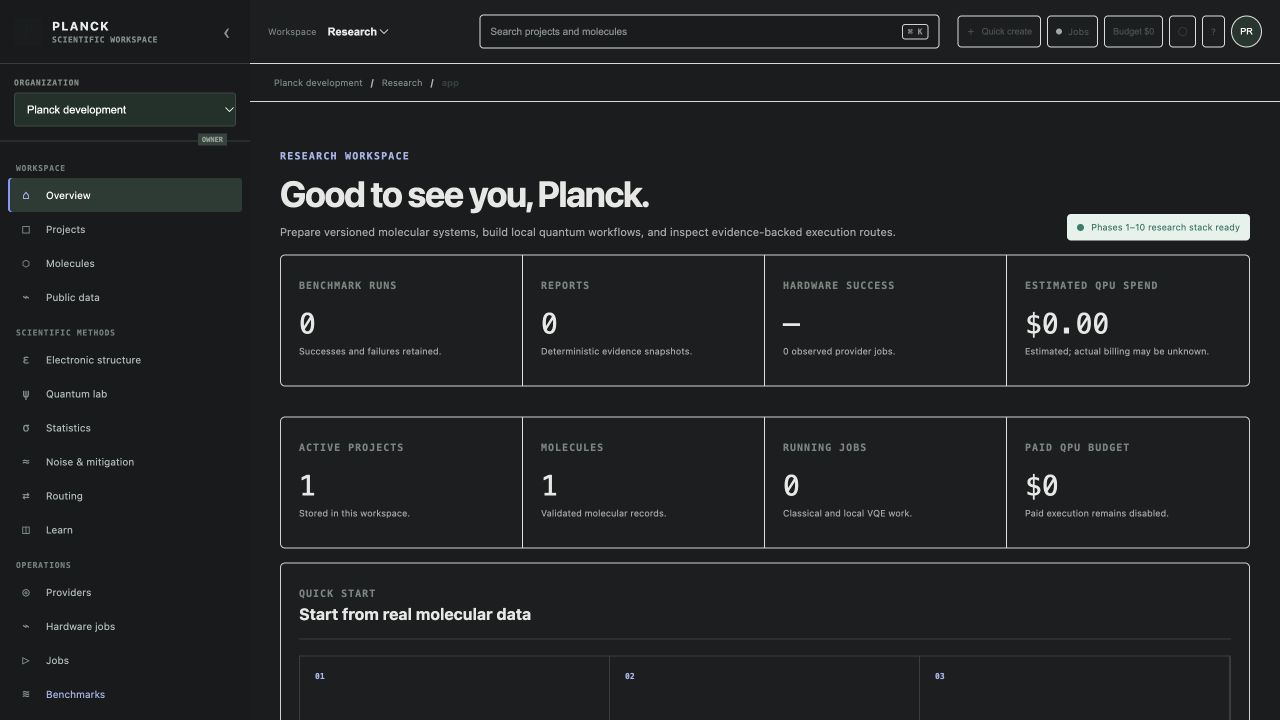
The local development seed contains an H₂ method-development project with a molecular hydrogen record. A researcher can use it to follow the actual workspace path: inspect the project and molecule versions, open the electronic-structure workspace, choose a supported classical method and basis, review resource checks, and submit a local reference calculation when the complete services are running. The seed itself is not a result and the captured dashboard intentionally shows no completed benchmark or paid hardware job.
From a suitable classical problem, the researcher can inspect active-space selection, validate the generated Hamiltonian, compare fermionic and mapped operators, and create a local Aer VQE run. The application records optimizer history and supports comparison against the classical reference. A router can then show which route classes have sufficient evidence. This workflow demonstrates how Planck connects molecular identity, method inputs, local job state, and provenance; it does not claim quantum advantage or make the H₂ example evidence for another molecule.
Confirm H₂ identity, project objective, structure revision, and that paid quantum execution remains disabled.
Select a supported method and basis, review resource guards, then inspect convergence and result provenance.
Choose an active space, validate its Hamiltonian, and inspect a selected qubit mapping and Pauli terms.
Use the supported simulator and optimizer, inspect convergence, and compare only compatible problem versions.
KEEP THIS CLOSE
Versioned molecular structures, geometry, charge and spin, basis and method choices, active-space settings, and explicit resource policy.
Classical results, Hamiltonians, mapped operators, local VQE histories, route evidence, job records, reports, and reproducibility artifacts.
Check geometry, convergence, method compatibility, resource guards, route evidence, provider calibration, and policy before interpreting a result or submitting hardware work.
TERMS IN CONTEXT
WHEN SOMETHING NEEDS ATTENTION
Inspect normalized failure details, geometry, charge/spin, supported method and basis, and resource checks before changing the specification.
Check required backend, calibration, pricing, simulator, route, policy, and budget evidence. Missing evidence keeps the route unavailable.
Check the API and object-storage health as well as file support. The public web shell alone does not provide upload persistence.
06 / SCOPE AND LIMITS
Planck never invents backends, prices, calibration, results, or claims of quantum advantage. Provider routes remain unavailable until their evidence and policy gates pass.
Confirm the current capability state in the application before starting work. A planned operation, a generated preview, or a queued job should not be described as a validated scientific result.
SEE PLANCK IN CONTEXT
Request a walkthrough with the Qubosis team.


