 qubosis
Run particle dynamics
Configure seeded initial states, periodic boundaries, and Velocity-Verlet integration with NVE or temperature control.
MOLECULES & SIMULATION / MOLECULAR SIMULATION

Understand motion. Frame by frame.
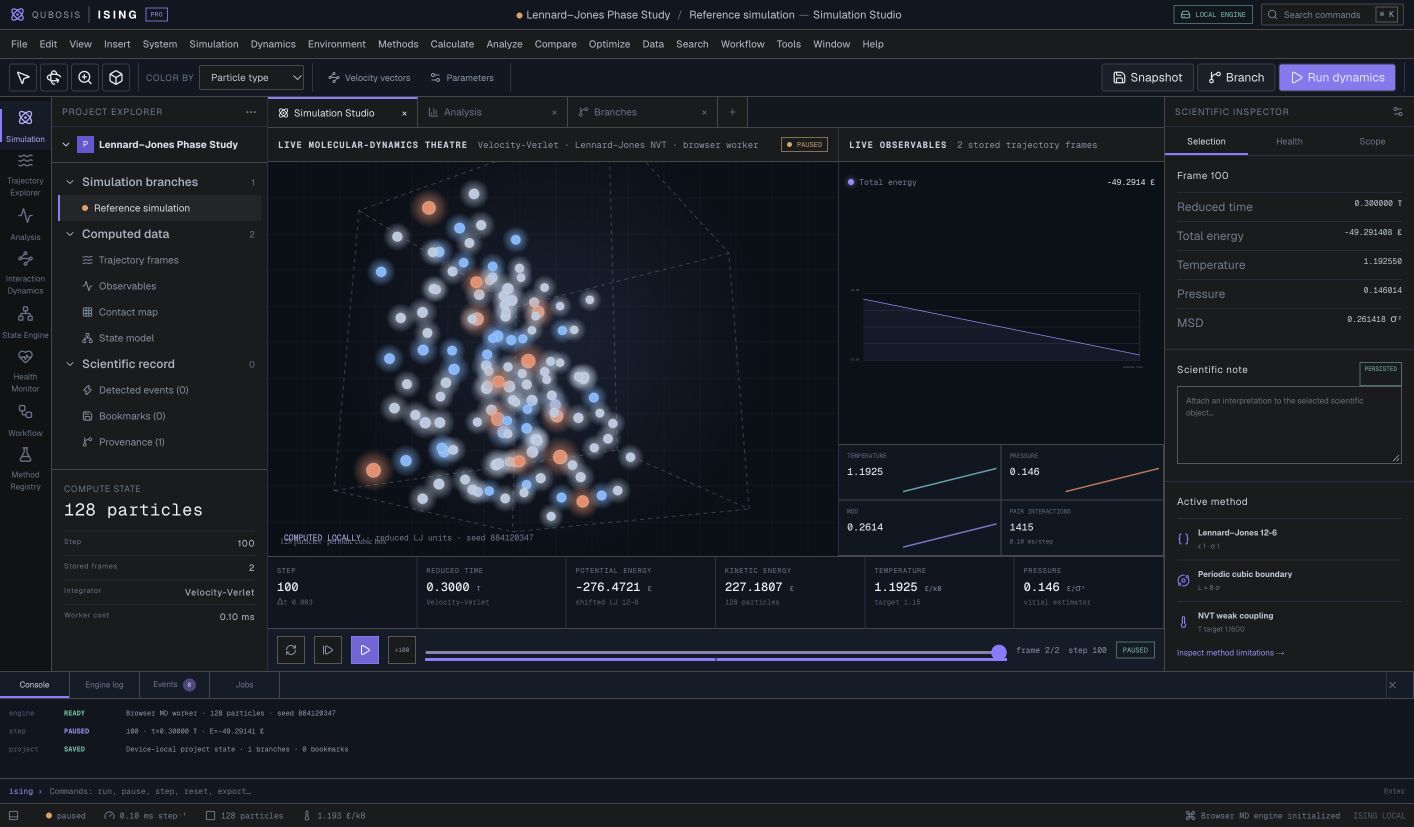
Explore particle dynamics with a real three-dimensional Lennard–Jones simulation. Ising connects trajectories, physical observables, statistical analysis, and reproducible project history in a focused simulation workstation.
01 / OVERVIEW
Explore particle dynamics with a real three-dimensional Lennard–Jones simulation. Ising connects trajectories, physical observables, statistical analysis, and reproducible project history in a focused simulation workstation.
The sections below describe the product capabilities, use cases, system requirements, and documented workflow in the source application.
02 / FEATURES
This inventory explains what each capability does, which records and decisions it touches, and where its scientific or operational boundary applies. External services and unavailable engines are identified as such.
Configure seeded initial states, periodic boundaries, and Velocity-Verlet integration with NVE or temperature control.
Follow energy, temperature, pressure, and displacement alongside synchronized trajectories and bookmarks.
Analyze distributions, energy drift, and radial structure. Branch a run and export a portable `.ising.json` project.
Construct a lattice and initialize velocities using a repeatable seed. Remove center-of-mass momentum and rescale to the chosen target temperature so runs can begin from an explicit, reviewable initial state.
Calculate the shifted 12–6 pair potential and pair forces for an unbonded particle system. Ising operates in reduced units and does not substitute a protein force field or infer atomistic chemistry from particle labels.
Advance trajectories with Velocity-Verlet using periodic cubic boundaries and the minimum-image convention. Choose NVE evolution or the implemented weak-coupling temperature control and preserve the settings in the run configuration.
Use capped particle displacements and backtracking to reduce potential energy. Inspect convergence and the resulting state before using a minimized configuration as a starting point for a later simulation.
Navigate exact trajectory frames while energy, temperature, pressure, density, displacement, force, and momentum diagnostics refer to the same simulation state. Bookmarks, annotations, events, and device-local project persistence retain points of interest.
Compute descriptive summaries, block uncertainty, autocorrelation, effective sample size, energy drift, diffusion regression, radial distribution, contact occupancy, energy-derived state populations, and transition counts.
Preserve configuration, parentage, provenance, and run summaries when branching from a saved state. Compare alternative initial states or settings without replacing the trajectory that motivated the new run.
Import and export `.ising.json` projects through schema and validation checks. Keep run settings, frame data, bookmarks, events, and provenance together for a local handoff.
The UI communicates with an isolated Web Worker numerical engine through typed simulation state. Future backends can stream compatible frame, observable, event, and status records without the UI pretending those adapters already exist.
03 / SYSTEM REQUIREMENTS
Node.js 22.13 or newer and a modern browser. The numerical engine runs in an isolated Web Worker; the current workflow is local-first.
From the Ising directory, run `npm install` and `npm run dev`. Open the local address printed by the development server. Use `npm run lint` and `npm run build` to prepare a production build.
04 / USE CASES
These examples show how the product’s implemented tools can be combined. They describe workflows, not guaranteed scientific outcomes.
Teach and inspect how initial conditions and integration settings affect a reduced-unit particle system.
Compare NVE and weak-coupling temperature-controlled runs using the same initial seed.
Examine energy drift, radial distribution, diffusion, state populations, and contact occupancy.
Preserve a trajectory bookmark and branch a simulation to explore a changed configuration.
Teach how temperature, density, initialization seed, and integration settings affect a reduced-unit particle trajectory.
Compare NVE and weak-coupling temperature-control runs from comparable initial states while reviewing energy drift.
Inspect a radial distribution function, diffusion estimate, contact occupancy, or state transition alongside the exact trajectory frame.
Bookmark a transition, branch the project, and test one changed parameter while keeping the parent run intact.
05 / DOCUMENTATION
A detailed operating manual from first setup through advanced analysis, review, collaboration, and export. Each section explains the records to prepare, the steps to take, how to read the result, and what remains outside the implemented product.
A guide to the sequence of work in Ising. Steps can require review or configured services before continuing.
FIND YOUR NEXT STEP
15 of 15 chapters
FOUNDATIONS
Ising is a local-first particle simulation workstation. Its current scientific core evaluates a shifted Lennard–Jones 12–6 pair potential in three dimensions, integrates motion with Velocity-Verlet, applies cubic periodic boundaries and the minimum-image convention, and can optionally regulate temperature through weak coupling. Particle positions and plotted observables come from simulation frames rather than a decorative animation.
The model uses reduced units. It is useful for exploring particle dynamics and physical behavior, but it is not a validated biomolecular package. It does not include bonded topology, electrostatics, protein force fields, constraints, particle-mesh Ewald, GPU kernels, or external HPC execution.
FOUNDATIONS
In Simulation Studio, choose a seeded particle arrangement and review the system size, density, periodic box, potential parameters, and initial velocity setup. The engine supports lattice construction, Maxwell-like velocity initialization, center-of-mass momentum removal, and target-temperature rescaling. Record the random seed and configuration so a run can be repeated.
Check for close contacts or an unstable starting geometry before integrating. Force-driven energy minimization with capped displacements and backtracking is available to prepare a system. Do not assume a visually plausible arrangement has low energy; inspect the force and energy diagnostics.
Start with a particle count and density that make the behavior easy to inspect.
Record the seed and Lennard–Jones parameters with the project configuration.
Choose NVE or weak-coupling temperature control and record the time step.
Review energy, force, momentum, and box diagnostics before starting the trajectory.
FOUNDATIONS
Start a run and use the available pause and single-step controls when you want to inspect a transition carefully. Trajectory frames are synchronized with observables and events. Move between the 3D theatre and Trajectory Explorer without losing which frame is selected. Add a bookmark and annotation when a configuration merits closer review.
Branch from a bookmarked or saved state when testing another configuration. The branch keeps its parentage, settings, provenance, and summary so it can be compared with the original. Export a portable `.ising.json` project to continue on another machine; validate the import rather than trusting a filename alone.
FOUNDATIONS
Observable Analysis provides potential, kinetic, and total energy; kinetic temperature; virial pressure; density; unwrapped mean-squared displacement; force and momentum diagnostics; and other statistics. Inspect energy drift before extending a run. For temperature-controlled runs, distinguish the thermostat behavior from NVE energy conservation expectations.
The analysis workspaces can calculate descriptive statistics, block uncertainty, autocorrelation, effective sample size, energy drift, diffusion regression, radial distribution functions, contact occupancy, energy-derived state populations, and transition counts. Review how each statistic was estimated and the time interval it covers. A number without its sampled frames and units is hard to interpret.
FOUNDATIONS
Use consistent parameters when comparing runs, or make the changed setting explicit. Different seeds can reveal variability; different time steps or ensembles alter the numerical experiment. Label any comparison with the parent run, integration settings, and observable definition. Keep raw trajectory data separate from plotted summaries when sharing results.
Project import and export perform validation and retain run summaries, bookmarks, branches, and provenance. Preserve the project file with the code version and analysis notes. Local browser storage is device-specific, so use exports as backups and transfer packages deliberately.
FOUNDATIONS
A simulation can help teach and explore model behavior, but its conclusions are limited by its potential and assumptions. Ising does not currently implement protein force fields, bonded topology, electrostatics, GPU kernels, or external high-performance computing. It should not be described as validated molecular dynamics for biomolecules.
If a run becomes unstable, inspect the time step, starting geometry, density, force diagnostics, and energy drift. Use a smaller step or revise the setup only after recording why. Do not hide numerical instability by selecting a later frame or changing display scaling.
WORKING IN DEPTH
Ising runs a real three-dimensional molecular-dynamics calculation for unbonded particles using a shifted Lennard–Jones 12–6 potential in reduced units. The model includes pair forces, a periodic cubic box, and a minimum-image convention. Read the model and units panel before comparing an observable with a value reported in physical units elsewhere.
This system is useful for studying particle dynamics and statistical behavior, but it is not a biological molecule simulator. It contains no bonded topology, protein force field, electrostatics, constraints, PME, GPU kernels, or external HPC backend. A particle visualization should be interpreted as the trajectory of this reduced model, not as an atomistic protein or material prediction.
WORKING IN DEPTH
Choose particle count or lattice configuration, density, temperature, and initialization seed. Velocity initialization is repeatable for a fixed configuration and seed; center-of-mass momentum is removed and velocities can be rescaled to the target temperature. Record the chosen box and state because they set the starting conditions for the whole trajectory.
Use force-driven minimization when a configuration needs relaxation before dynamics. Its capped displacements and backtracking reduce potential energy through the implemented algorithm. Review the minimized coordinates and energy before using them; minimization does not discover a global minimum or validate an experimental structure.
Set density, target temperature, particle count or lattice, and a documented random seed.
Confirm box size and minimum-image assumptions for the intended reduced-unit system.
Inspect the energy and displacement history before accepting the relaxed state.
WORKING IN DEPTH
Velocity-Verlet integrates positions and velocities using the force at each step. Select NVE when the goal is to observe energy-conserving dynamics under the model and settings. The optional weak-coupling temperature control adjusts kinetic temperature toward a target; it changes the dynamical behavior and should be reported with the run.
Choose a time step and trajectory length appropriate to the engine's supported limits. Compare trajectories only when the input state, units, force model, and integration settings are known. A temperature controller is not a thermostat with a full physical bath model; describe the exact weak-coupling option in methods and avoid implying a canonical ensemble unless supported by the implementation.
WORKING IN DEPTH
The simulation runs in an isolated Web Worker so the interface can keep responding while the numerical engine advances. The trajectory viewer navigates recorded frames, and linked observable panels synchronize with the selected frame. Use bookmarks and annotations to mark a transition or interval that deserves later analysis; event records preserve notable run changes.
When a trajectory appears unstable, inspect the exact frame, force diagnostics, total energy, temperature, and momentum before deciding whether to continue. The application preserves simulation status separately from visualization. A paused display or a finished animation is not enough to establish that every numerical step succeeded; inspect the run event and frame history.
Verify the model, seed, boundary, ensemble, integration, and frame output settings first.
Select a frame and check that metrics and structure correspond to the same index.
Add an annotation with the reason this state matters to the next comparison.
WORKING IN DEPTH
The observable panels include potential, kinetic, and total energy; kinetic temperature; virial pressure; density; unwrapped mean-squared displacement; force diagnostics; and momentum. Plot the full time series as well as selected summary values. Energy drift and total momentum can reveal numerical or configuration issues that are hidden by an attractive trajectory view.
Use block uncertainty, autocorrelation, and effective sample size to understand how many observations are effectively independent under the sampled trajectory. These diagnostics summarize the recorded series and their assumptions; a long trajectory does not automatically mean that all observables are equilibrated. State how burn-in, sampling interval, and blocks were chosen in any report based on the run.
WORKING IN DEPTH
The analysis workspace includes radial distribution functions, contact occupancy, energy-derived state populations, transition counts, and diffusion regression. Inspect the selected population, distance rule, lag or fitting interval, and unit basis. A radial distribution describes pair structure for the simulated model; it is not a biological contact map unless the underlying representation and method support that interpretation.
Diffusion regression depends on the chosen time interval and the relationship between unwrapped mean-squared displacement and time. State populations and transitions use the implemented energy-derived classification, so review thresholds and state definitions before comparing systems. Ising does not infer a free-energy landscape or a validated biochemical mechanism from a population plot.
WORKING IN DEPTH
Branch from a saved run when a new question changes the seed, density, temperature control, time step, or other configuration. The branch retains its parentage and method context; leave the original trajectory unchanged so the comparison remains inspectable. Use parallel comparison only when the selected runs have compatible observables and clearly recorded settings.
Projects persist device-locally and can be exported as validated `.ising.json` files. Check import validation and file identity when transferring a project. Preserve the full provenance and run summary, and keep screenshots or exported values linked to the exact project version from which they came.
WORKING IN DEPTH
Ising is appropriate for controlled exploration of a simple Lennard–Jones particle model, method demonstrations, and reproducible comparisons under explicit assumptions. It can show how a change in initialization or integration setup affects the computed trajectory and observables. Those are results of the specified reduced model only.
If a question requires molecular bonds, electrostatics, protein force fields, solvent models, long-range interactions, constraints, GPU acceleration, or a cluster queue, the current repository does not provide those features. The interface may show future backend contracts, but they are not active execution routes. Use a separately validated simulation package and preserve the method provenance when moving beyond this model.
WORKED EXAMPLE
A methods workshop wants to show how a temperature-control choice changes a simple particle simulation. The instructor creates a seeded lattice, records density, target temperature, box, and integration time step, then saves the initial state. The first branch runs NVE; a second branch starts from a compatible state and enables weak-coupling temperature control. Both trajectories use the same reduced-unit Lennard–Jones model and periodic boundary handling.
Learners select equivalent trajectory frames and compare total-energy behavior, kinetic temperature, pressure, and mean-squared displacement. They bookmark a point of interest, review autocorrelation and block uncertainty, and inspect the radial distribution function or diffusion fit under the configured interval. This comparison demonstrates the implemented numerical core only. It is not a protein simulation, and differences between the branches should not be generalized to a molecular system that the engine does not model.
Record seed, density, temperature, particle arrangement, and reduced-unit box dimensions.
Keep one NVE configuration and change only the control setting in the second branch.
Use matching time/frame selections and inspect energy drift and temperature behavior.
Include configuration, parentage, analysis settings, bookmarks, and the project manifest.
KEEP THIS CLOSE
Particle configuration, density, target temperature, random seed, periodic box, time step, ensemble setting, and analysis intervals.
Trajectory frames, energies, temperature and pressure series, displacement diagnostics, structural analyses, bookmarks, and portable projects.
Check reduced units, initialization, time step, energy drift, sampling interval, and the analysis fitting window before comparing trajectories.
TERMS IN CONTEXT
WHEN SOMETHING NEEDS ATTENTION
Inspect the time step, force diagnostics, initial geometry, and selected ensemble. Compare controlled branches instead of masking instability with a plot scale.
Check the selected frame index, recorded output interval, and run identity so observable and trajectory views refer to the same state.
Inspect the unwrapped displacement series and regression interval. Report model units and fitting assumptions with the estimate.
06 / SCOPE AND LIMITS
The current engine is a reduced-unit Lennard–Jones particle model. Protein force fields, bonded topology, electrostatics, constraint solvers, GPU kernels, and external HPC execution are not included.
Confirm the current capability state in the application before starting work. A planned operation, a generated preview, or a queued job should not be described as a validated scientific result.
SEE ISING IN CONTEXT
Request a walkthrough with the Qubosis team.


